
QuantWheel places a daily limit on how many times each account can force a Resync. When you hit the limit, Resync becomes unavailable until the counter resets — typically at midnight UTC. This is by design, to keep sync load reasonable across all users, but if you're hitting the limit regularly, a plan upgrade gives you a higher allowance.
Symptoms you might see
- A "N syncs remaining today" indicator appears near the Resync button
- Clicking Resync returns a message like "Sync limit reached for today"
- Data isn't updating even though you've been clicking Resync repeatedly
- Scheduled syncs still work, but on-demand syncs don't
Most likely cause
You've used all your on-demand syncs for the day. The counter resets at midnight UTC — not your local midnight — so the effective reset time depends on your timezone.
- In the US, UTC midnight falls in the evening (7 PM ET / 4 PM PT)
- In Europe, UTC midnight is early morning in most countries
- In Asia-Pacific, UTC midnight falls during daytime hours
How to diagnose
Step 1: Check the sync remaining indicator
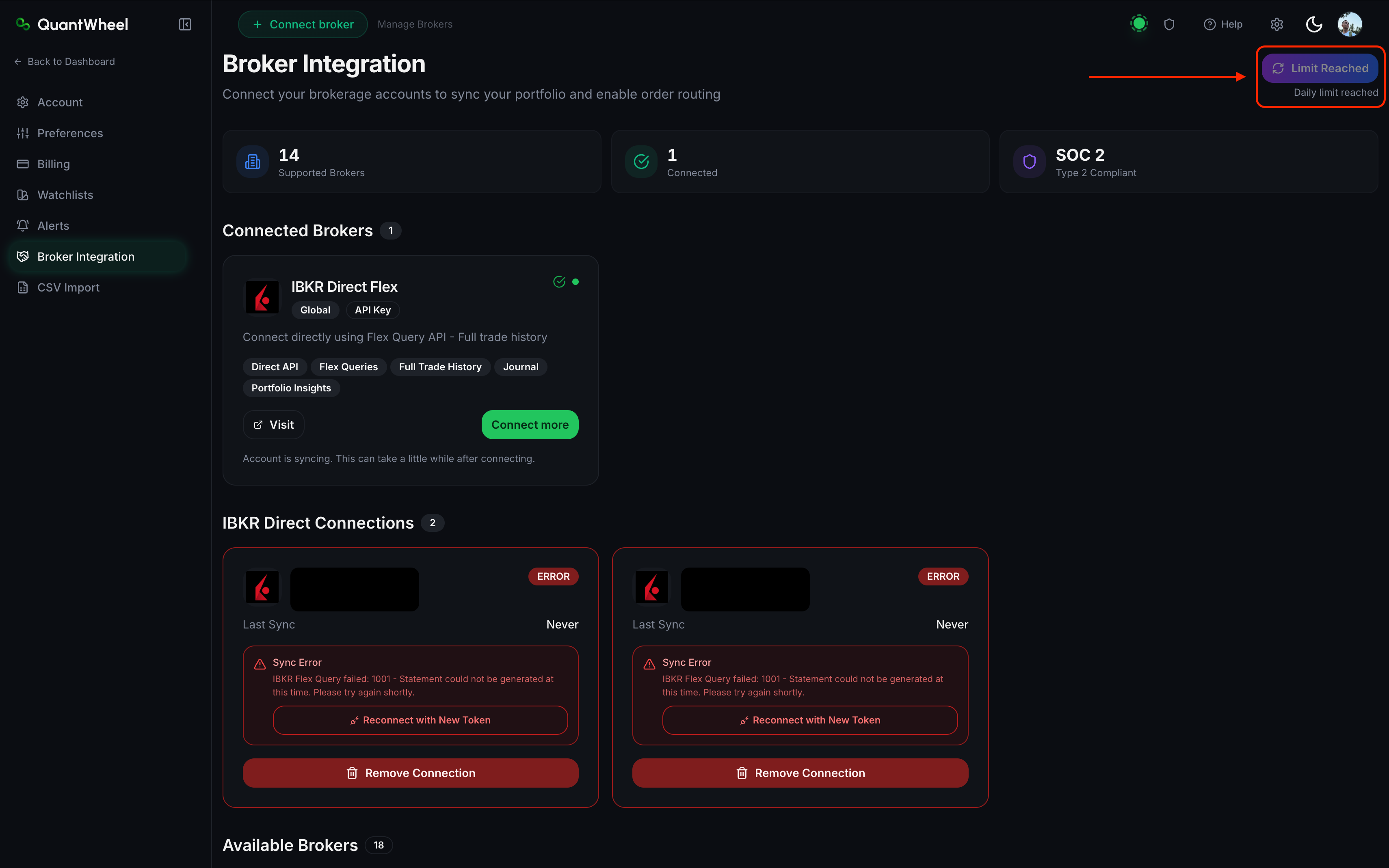
On any page with a Resync button (Broker Integration, Profit View, Trades), look near the button for text like "2 syncs remaining today" or "Sync limit reached."
If the counter shows 0 or you see the limit-reached message, you've hit the daily allowance.
Step 2: Check the reset time
The counter resets at midnight UTC. If you're not sure when that is for your timezone, do a quick mental conversion:
- UTC is 4-8 hours ahead of the US (depending on timezone and DST)
- UTC is 0-2 hours behind most of Europe
- UTC is 5-12 hours behind most of Asia-Pacific
Alternatively, wait for the next scheduled sync — those still run at their normal intervals even when on-demand syncs are exhausted.
How to fix
Option 1: Wait for the reset
Simplest option. At midnight UTC, the counter refills and you can Resync again.
Option 2: Wait for the next scheduled sync
Each broker has its own sync schedule that runs automatically in the background. These scheduled syncs aren't affected by the daily on-demand limit. Check your broker's typical sync cadence (most SnapTrade brokers sync every 15–60 minutes; Fidelity is 24-hourly).
Option 3: Upgrade your plan for a higher allowance
Higher plan tiers get a larger daily sync allowance. If you're on the $1 trial or a lower tier and hitting the limit regularly, upgrading to QuantWheel PRO raises the allowance significantly.
See Understanding QuantWheel plans for plan-tier details.
If that doesn't work
If the sync count shows remaining syncs but Resync still doesn't work, the issue isn't sync count — it's a sync error. See Broker sync failed or stopped working.
If you've upgraded plans but the old sync limit is still showing, log out and log back in to refresh your plan entitlements.