
Your complete options workflow built into the chart
Agentic Options Trading Platform
Analyze, Trade and Automate Options Trading From One Chart Across 15+ Brokers
$1 for 7 days • Cancel anytime • 14-day money-back guarantee
Jump to your part
The problem
Your Broker, a Spreadsheet and Three Tabs for One Trade
This is one options trade, spread across five windows.
“Rolling is where every spreadsheet I built died too.”
“Ok so how do you trade based on this?”
If you sell options
- Tracking breaks Your spreadsheet breaks when you roll, and your broker shows the wrong cost basis.
- Calls below cost After assignment, you sell calls below what you really paid.
- No roll signal You never know when to roll.
If you buy options
- Levels you can't use GEX makes sense on a video, but not on your trade.
- Missed moves You can't watch the chart all day, and the move happens while you're away.
- Too many tools You pay for several tools and still switch tabs to place one order.
Your Complete Wheel Workflow on the Same Screen
Your broker shows a loss on the shares, but the premium you collected has already lowered your real cost.
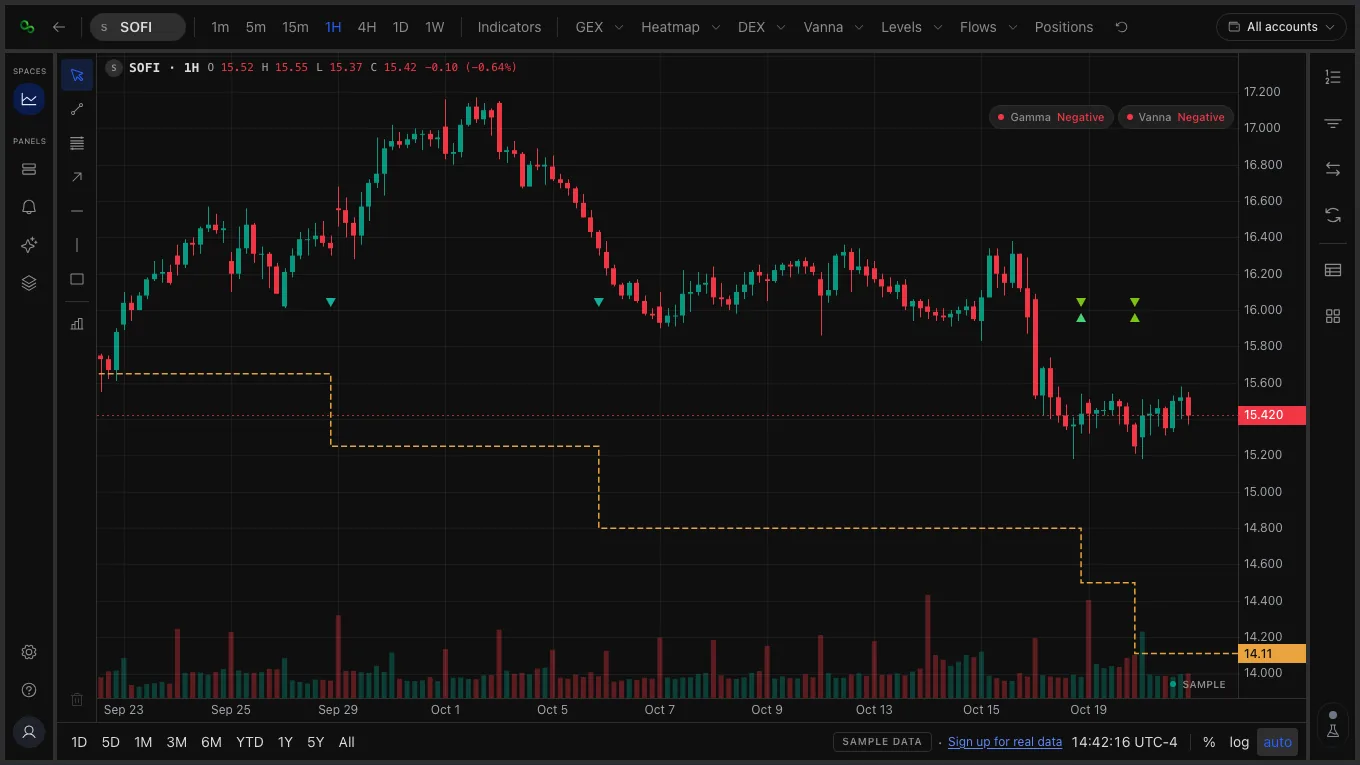
See the Options Levels Behind the Price Before You Buy
A chart of price alone does not show the options positions that sit around it.
Try the platform
Try The Demo Chart Before You Sign Up
Analyze the markets, place the trade, and automate your trading from the same chart.
Secure broker integrations
Keep Your Broker. Place Orders From The Chart.
Connect your broker and your positions sync on the chart.
Metrics from users who connected their broker
Loading
Loading
Loading the latest figures.
 TradeStationTrade & Sync
 E*TradeTrade & Sync
 tastytradeTrade & Sync
 WealthsimpleTrade & Sync
 WebullTrade & Sync
 MoomooTrade & Sync
 PublicTrade & Sync
 TradierSync · Trade soon
 TradeZeroSync · Trade soon
 AlpacaSync · Trade soon
 FidelitySync-only
 RobinhoodSync-only
 SchwabSync-only
 Interactive BrokersSync-only
 QuestradeSync-only
- See all brokers
- And 9 more brokers
 Trade & Sync
Your breakeven, drawn for you
It updates on the chart as your positions sync.
Place orders from the chart
Trade & Sync brokers execute the orders you place.
Your money stays at your broker
QuantWheel never holds it. Disconnect any time.
 In the app, real-time options prices are licensed from OPRA.
Testimonials
What traders are saying
Used by over 2,000 traders globally.
Why one place
One Chart for the Jobs You Split Across Tools
Run every job of a trade without copying between tabs.
| Job | What traders use today | In QuantWheel |
|---|---|---|
| Analyze Analyze markets | ||
| Journal | A spreadsheet | Trades synced from your broker into a journal |
| Cost basis | Working it out by hand | Breakeven line on the chart |
| GEX | A GEX service | GEX and heatmap on the chart |
| Options flow | A flow service | Options flow on the chart for major tickers |
| Indicators | A charting site | 100+ indicators, or describe your own to the AI |
| Trade Place a trade | ||
| Find the trade | A screener site | Calls and puts to sell, filtered by days, delta and yield |
| Place the trade | Your broker's app | Order ticket on the chart, sent to your broker |
| Automate Automate trading | ||
| Alerts | Watching the chart all day | Alerts for prices, wheels and saved searches |
| Auto copy trading | A trader's posts in a chat group | Auto copy trading Coming soon |
| AI trading agents | Writing your own bot | Auto trading AI agents Coming soon |
| Marketplace Buy or Sell | ||
| Broker offers | Your broker's standard terms | Better trading conditions from brokers, at no additional fee |
| Buy indicators | A separate indicator store | Indicators from QuantWheel and other traders |
| Sell indicators | Your own website and payments | Sell and earn from your indicators |
| Buy copy trading | A paid chat group | Copy trading from other traders Coming soon |
| Sell copy trading | Your own paid group | Sell and earn from your copy trading Coming soon |
| Buy trading agents | Code from a freelancer | Trading agents built by other traders Coming soon |
| Sell trading agents | A code marketplace | Sell and earn from your trading agents Coming soon |
| Every job | Separate tools and tabs | 1 chart |
FAQ
Frequently Asked Questions
How QuantWheel works, what it can access, and what to expect before you connect an account.
QuantWheel
Ask your AI about QuantWheel





Start here
Your Complete Options Workflow Built Into The Chart
Analyze, Trade and Automate Options Trading From One Chart Across 15+ Brokers
$1 for 7 days • Cancel anytime • 14-day money-back guarantee