
GEX AI is the fastest way to read the gamma-exposure snapshot for a single ticker. You pick a ticker and one or more expirations; QuantWheel pulls the current option chain, computes the full GEX metrics, renders the GEX-by-strike chart, and generates an AI narrative summarizing what the positioning suggests for the session.
It's the tab most GEX users open first each morning.
Before you start
Required:
- QuantWheel GEX or QuantWheel PRO subscription. GEX AI is tier-gated; Sandbox users see a delayed version with demo data.
- Familiarity with what GEX means. See Understanding GEX first if you're new.
Time to complete: 5 minutes for a first run; under 1 minute thereafter.
Steps
1. Open GEX AI
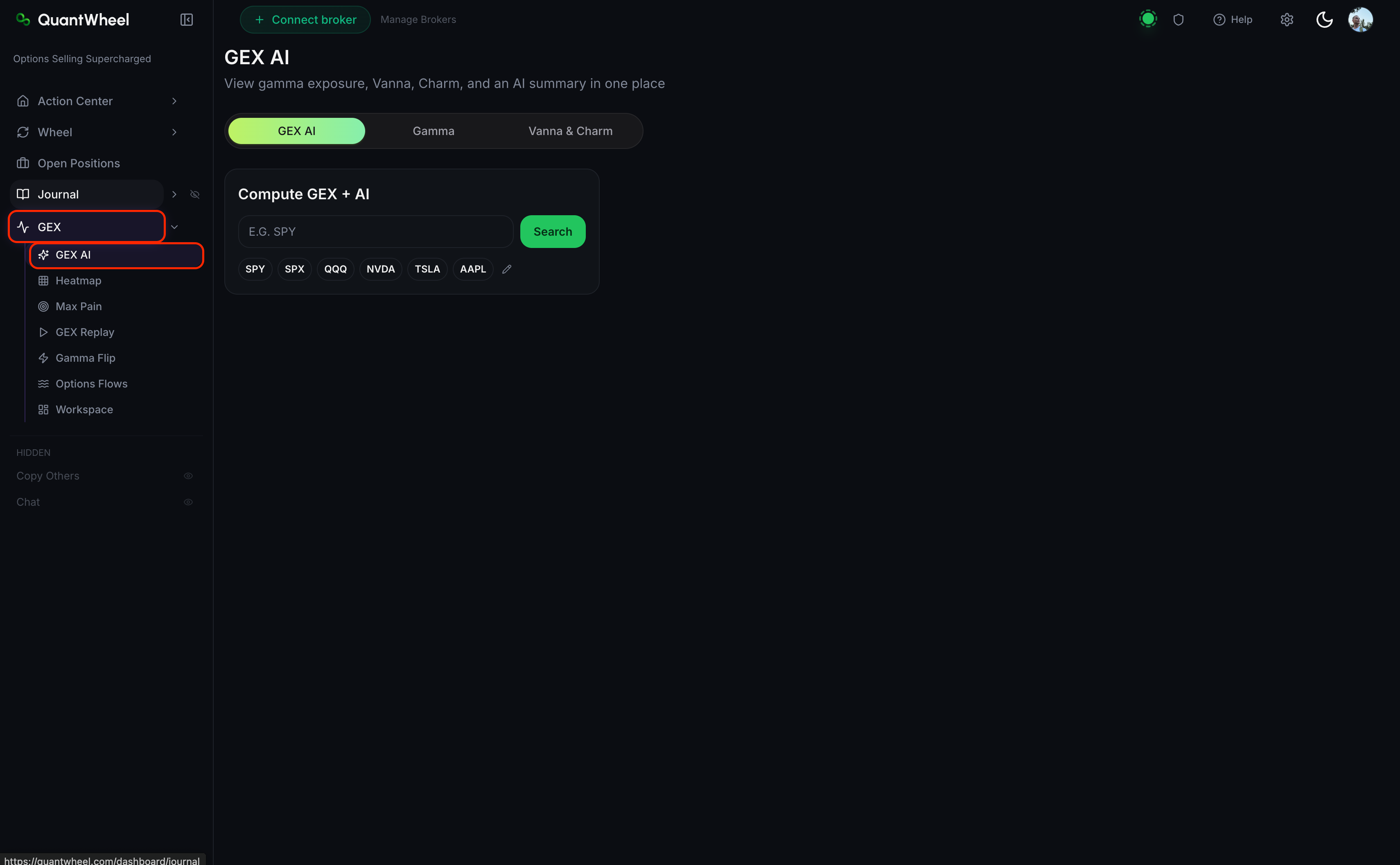
In the sidebar, open GEX → GEX AI.
2. Enter a ticker (or pick a popular one)
In the ticker input at the top, type any stock or index ticker. The tab works best on heavily-optioned instruments — SPY, SPX, QQQ, NVDA, TSLA, AAPL are surfaced as one-click popular choices. GEX signal is weaker on low-liquidity tickers.
3. Select expirations
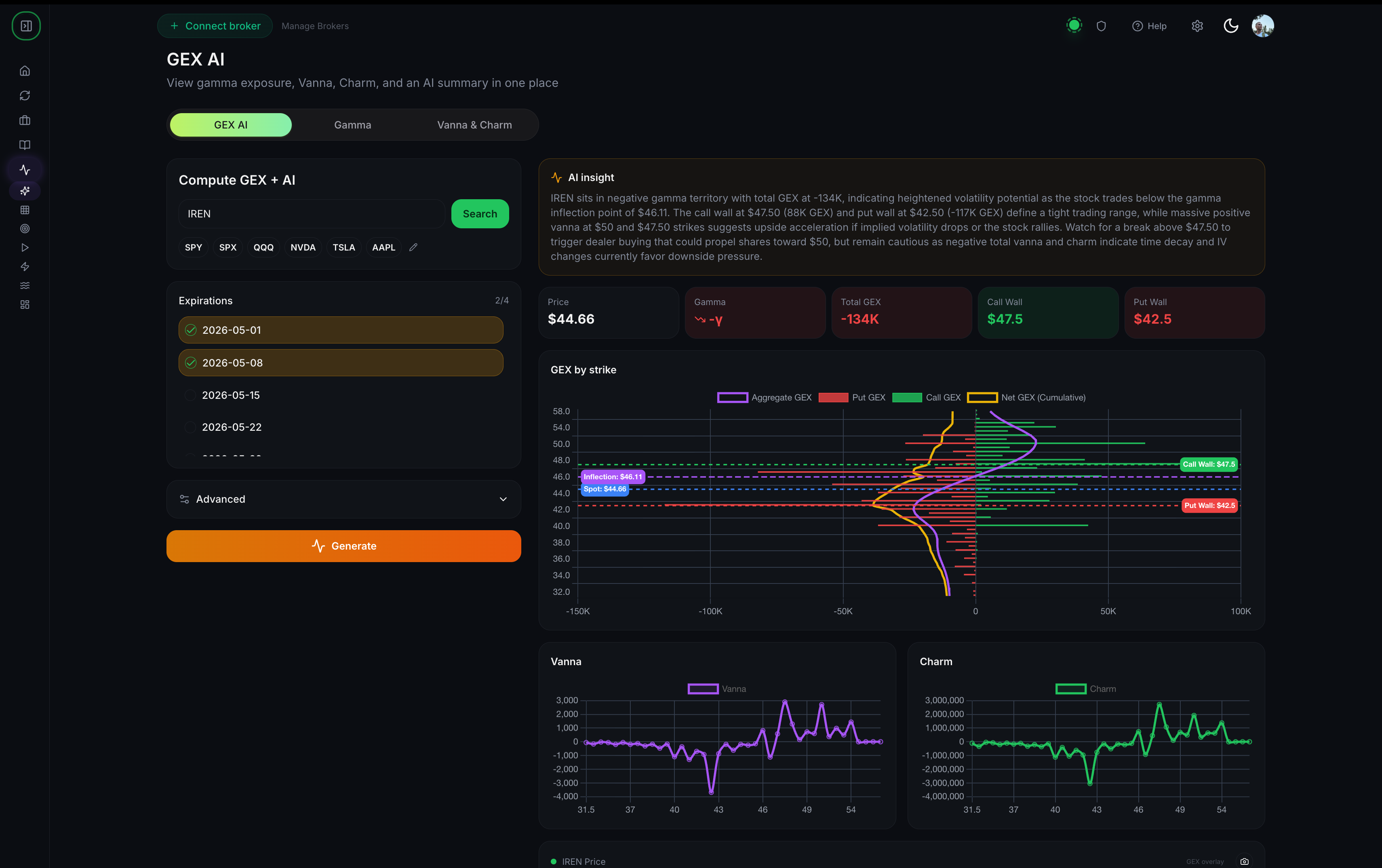
Pick one or more expirations from the expirations list. Multi-select is supported — selecting 3 expirations gives you a blended view across those dates.
Which expirations to pick:
- Single nearest weekly expiration — for intraday and next-day views
- Next 2–3 monthly expirations — for multi-day structural view
- Single monthly expiration — for cleaner signal, less noise from short-dated flow
4. Open Advanced if needed
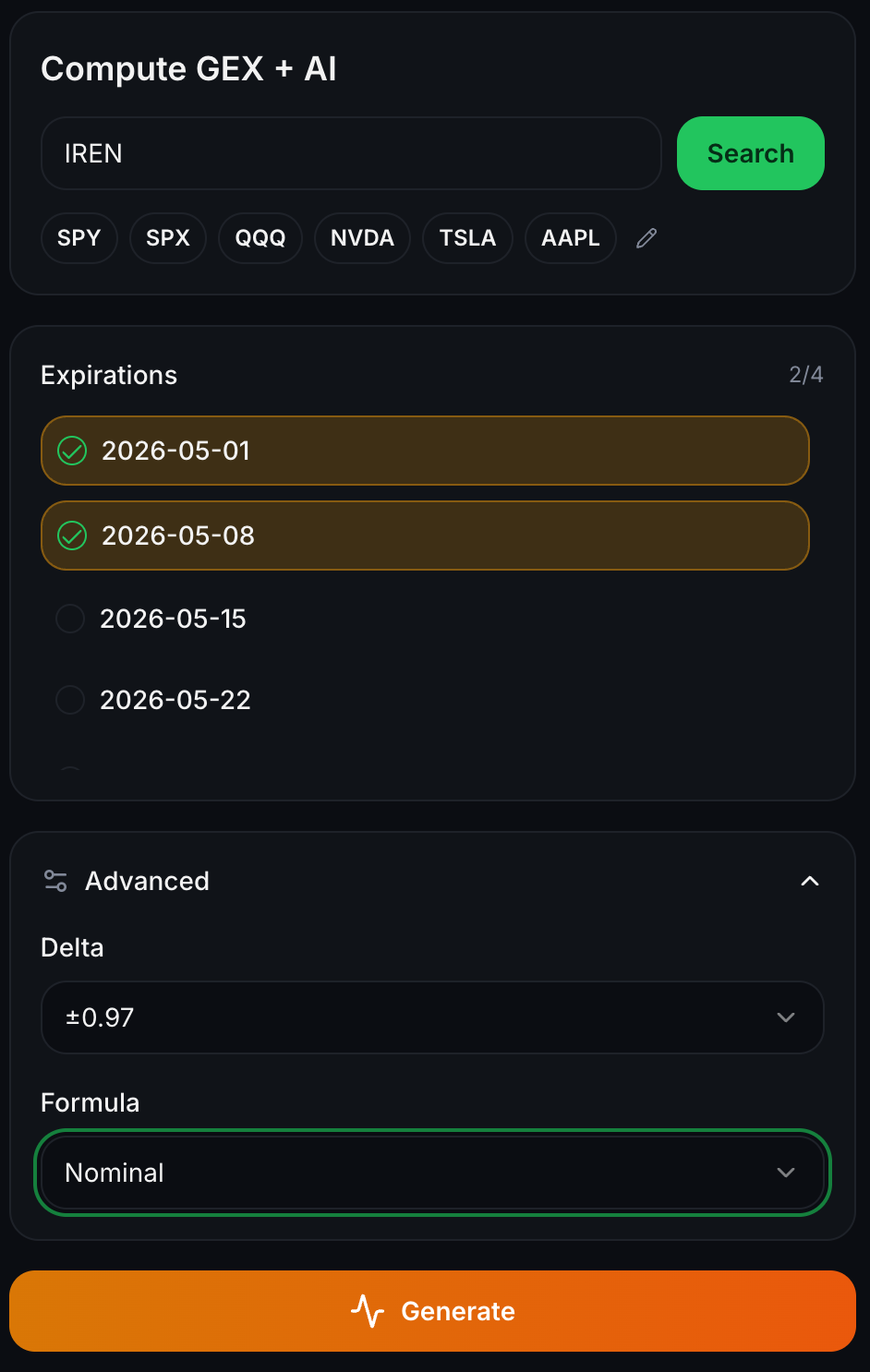
Below the expirations, an Advanced section collapses by default. Expand it if you need:
- A specific calculation formula (different GEX formulations exist; the default is commonly used)
- A strike range restriction
- Other tuning parameters
For most users, defaults work fine. Advanced is for traders who want specific formulations.
5. Click Generate
Click Generate. QuantWheel pulls the option chain, computes GEX, and renders the full view in a few seconds.
6. Read the output
The generated view has four sections.
AI insight text block. A short narrative describing what the positioning suggests — where the gamma is concentrated, what regime the ticker is in, what levels to watch. This is QuantWheel's interpretation of the current snapshot.
Metric cards:
- Price — current underlying price
- Gamma — total gamma exposure at current price
- Total GEX — aggregate GEX across selected expirations
- Call Wall — price level with largest call gamma
- Put Wall — price level with largest put gamma
GEX by strike chart. A chart with strikes on the X-axis and gamma exposure on the Y-axis. Four overlays are typically shown: Aggregate GEX (the total), Put GEX (the negative contribution from puts), Call GEX (the positive contribution from calls), and Net GEX Cumulative (running total).
The chart reveals structure the cards can't — you see the shape of where gamma is concentrated, not just its aggregate.
Vanna and Charm mini-charts. Second-order views. Deep dive: How to read Vanna and Charm exposures.
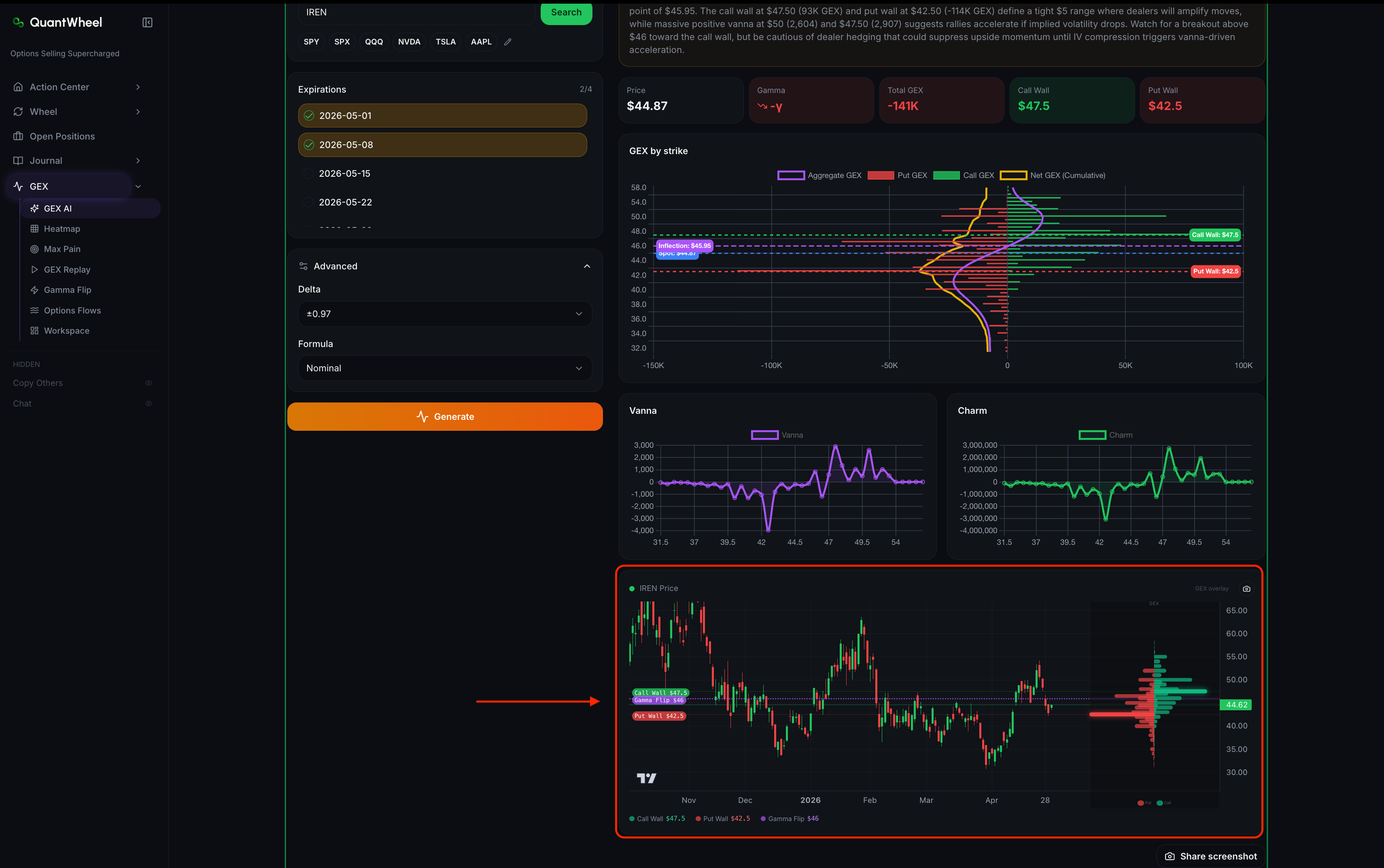
Price chart with GEX overlay. Candlestick price chart with the Call Wall, Put Wall, and Gamma Flip plotted as horizontal lines. This is the action view — you see where current price sits relative to the structural levels.
How to use what you see
Morning ticker check
Open GEX AI on your primary tickers each morning. Look at:
- Where is price relative to Call Wall and Put Wall? Midrange or near a level?
- Is Total GEX positive (long-gamma, stabilizing) or negative (short-gamma, trending)?
- What does the AI insight flag as notable?
A 3-minute GEX AI review gives you the structural map for the day's trading.
Before placing a directional trade
For any directional trade on a heavily-optioned ticker, check GEX AI first:
- If you're buying a breakout above the Call Wall, understand you're betting the wall breaks
- If you're fading into the Put Wall from below, understand you're betting the wall holds
- If you're trading mean reversion but GEX is sharply short-gamma, you're trading against structural headwinds
After a big move
Regenerate the view after meaningful price moves. GEX updates continuously as open interest changes; the 9 AM snapshot may not reflect afternoon positioning. A refresh tells you whether the move reset the structural map.
📸 SCREENSHOT: use-gex-ai-step-4.png
Common issues
The generated view is stale.
Each generation creates a snapshot. Click Generate again to refresh. Unlimited regenerations on PRO; limits apply on GEX-only plans.
The AI insight contradicts the chart.
The AI insight is the narrative layer; the cards and chart are the data layer. If they seem to disagree, trust the data — the insight is an interpretation. The discrepancy usually means the setup is genuinely ambiguous.
Why do different expirations give different Call Walls?
The Call Wall is the strike with peak call gamma for the selected expirations. Different expirations have different open interest profiles. A multi-expiration view blends them; a single-expiration view isolates one. For intraday trading, the nearest weekly's Call Wall matters most; for multi-day views, the next monthly usually wins.
Can I use GEX AI for stocks other than the popular ones?
Yes — any ticker with listed options works. But GEX signal is weaker on low-liquidity tickers because dealer hedging is a smaller share of order flow. The popular ticker shortcuts aren't exclusive; they're just surface-area defaults for the most-traded names.
How often should I regenerate during the day?
For active intraday trading: every 30–60 minutes, and after any significant price move (>0.5% for an index, >2% for a single name). For swing trading: once per day is usually enough. For the wheel strategy specifically: GEX is less essential — wheel traders should check but shouldn't live on this tab.
Related
- Understanding GEX and what it tells you
- How to read the GEX Heatmap
- How to track gamma flip events and set alerts
- How to read Vanna and Charm exposures
Risk disclaimer: Options trading involves substantial risk of loss and is not suitable for all investors. Past performance does not guarantee future results. This content is for educational purposes only and is not investment advice.