
The Options filter group in Find Deals has 12 filters. These are the core wheel-strategy filters - every screen uses at least a few of them. This page is a reference for what each filter means and how to use it. Keep it open in a second tab while you're building filter sets.
Before you start
Required:
- Familiarity with the Find Deals layout. See How to use the Find Deals screener.
- Find Deals open, with the Simple/Advanced toggle set to Advanced (Simple mode hides some of these filters).
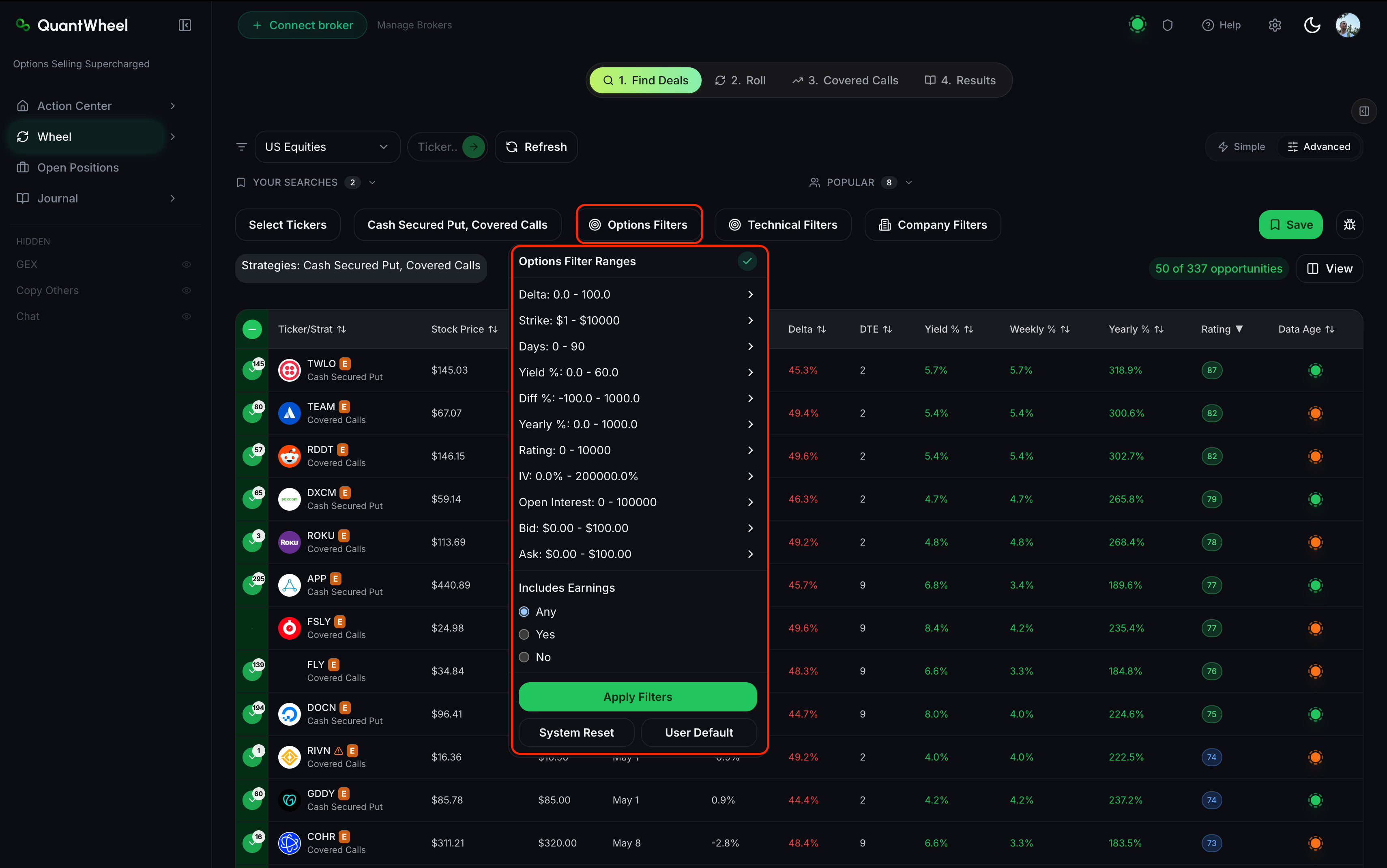
The 12 options filters
Delta
What it is: A measure of how much an option's price changes per $1 move in the underlying stock. Short puts have negative delta; short calls have positive delta. Delta also approximates the probability the option ends in the money at expiration - a delta of -0.20 on a short put means roughly 20% probability of assignment.
In QuantWheel: A range slider or min/max input. Default ranges shift based on the Strategy selector - Cash Secured Put defaults to a negative range, Covered Calls to a positive one.
How to use it: Delta is the primary risk dial on wheel trades. Conservative CSP wheels typically target delta between -0.30 and -0.15 (roughly 15-30% assignment probability). Aggressive income wheels push to -0.40 or wider. Covered calls follow the same logic with flipped signs - target 0.15 to 0.30 for conservative; wider for aggressive. Tightening delta reduces premium but also reduces assignment risk.
Strike
What it is: The strike price of the option contract - the price at which the option would be exercised.
In QuantWheel: A range filter. Usually constrained by the ticker scope's price range automatically.
How to use it: Use Strike when you have a specific price target in mind - "I'd buy this stock at $50 but not $55." More often, you'll filter by Diff % (distance from current price) instead, because that scales across different-priced stocks.
Days (DTE)
What it is: Days to expiration - how many calendar days until the option expires.
In QuantWheel: A range filter. Typical ranges fall between 7 and 60 days.
How to use it: DTE controls the time-decay/gamma trade-off. Shorter DTE (7-21 days) has faster time decay but higher gamma risk - the position's P&L reacts sharply to underlying price moves. Longer DTE (30-45 days) is the standard wheel zone - meaningful premium, manageable gamma, enough runway to roll if needed. Much beyond 45 days, time decay slows and capital gets tied up without enough premium to justify it.
Yield %
What it is: The option's premium expressed as a percentage of the collateral required. For a cash-secured put, that's premium divided by the strike price × 100 shares.
In QuantWheel: A minimum-value filter. Setting "Yield % > 2" excludes contracts paying less than 2% on their collateral.
How to use it: Yield % is your per-contract return. To turn it into an annualized rate, multiply by (365 / DTE). A 2% yield on a 30-DTE contract annualizes to roughly 24% per year. Set a Yield % minimum that matches your Target Yearly Yield divided by the number of DTE periods you'll run per year.
Diff %
What it is: Percentage difference between the current stock price and the option's strike. For a short put, Diff % is typically negative (strike below current price); for a short call, positive.
In QuantWheel: A range filter. Values are percentages.
How to use it: Diff % scales across different-priced stocks more cleanly than the raw Strike. Setting "Diff % between -15 and -5" for CSPs means "show me strikes 5 to 15% below current price" - a reasonable conservative-to-moderate zone regardless of whether the stock is $20 or $400.
Yearly %
What it is: Yield % annualized. The per-contract yield multiplied by the number of those DTE periods in a year.
In QuantWheel: A minimum-value filter.
How to use it: Use Yearly % as your single-number return filter when you want to compare contracts of different DTEs on a level field. Setting "Yearly % > 20" returns only contracts that, if the same trade repeated back-to-back all year, would yield at least 20% annualized. Watch for the caveat: Yearly % assumes the contract keeps repeating at the same premium - in practice, IV fluctuates and the annualization is theoretical.
Rating
What it is: QuantWheel's composite opportunity score. Higher is better, given your current filter set. See How to read the opportunity Rating for detail.
In QuantWheel: A minimum-value filter (0-100 scale).
How to use it: Use a Rating minimum as a quality floor - "only show me Rating ≥ 70." Combined with other filters, this narrows the results to high-quality candidates fast. Don't rely on Rating alone, though - cross-check Yield and Delta on each row before picking.
IV (Implied Volatility)
What it is: The market's expectation of the underlying stock's volatility over the option's life, expressed as an annualized percentage. Higher IV means richer option premiums but also larger expected price swings.
In QuantWheel: A range filter. Values are percentages (annualized).
How to use it: IV is a two-sided dial. High-IV stocks pay more premium (good) but move more (bad for your cost basis if assigned). Conservative wheels filter to moderate IV (roughly 25-40%) - enough premium to be worth the trade, not so volatile that assignment lands you far below strike. Aggressive wheels accept higher IV for the premium boost.
Open Interest
What it is: The number of open option contracts outstanding at this strike and expiration. Higher open interest means more liquidity - easier to close or roll the position without a wide bid-ask spread.
In QuantWheel: A minimum-value filter.
How to use it: Set a minimum (commonly 100 or 500) to exclude illiquid contracts. Low-open-interest contracts have wide bid-ask spreads, which eats into your premium when you need to close or roll. Liquid contracts with 500+ open interest are a meaningful quality filter.
Bid
What it is: The highest price a buyer is currently willing to pay for this option contract.
In QuantWheel: A minimum-value filter. Values are dollars per share (multiply by 100 for contract value).
How to use it: Bid is the realistic price you'd receive selling this contract right now. Setting a Bid minimum (e.g., "Bid > 0.50") excludes penny options that pay essentially nothing after fees. For wheel traders, a $0.50 bid floor is a reasonable absolute-premium filter.
Ask
What it is: The lowest price a seller is currently willing to accept for this option contract.
In QuantWheel: A range filter, less commonly used than Bid.
How to use it: Use Ask primarily to check the bid-ask spread relative to Bid. A tight spread (Ask within 10% of Bid) indicates good liquidity. Wide spreads (Ask 25%+ above Bid) indicate poor liquidity and trouble exiting at fair prices.
Includes Earnings
What it is: A toggle that determines whether the screener shows contracts whose expiration falls after an upcoming earnings announcement.
In QuantWheel: A checkbox or toggle with options (typically: include, exclude, or earnings-only).
How to use it: Earnings events amplify IV in the weeks before, which shows up as richer premiums on the screener. But earnings introduce gap risk - the stock can jump or drop sharply after the release, blowing through strikes that looked safe. Conservative wheel traders usually exclude earnings; aggressive traders include them to harvest the IV premium and accept the gap risk.
Common issues
Filters that looked right returned zero results.
Options filters compound quickly. Two tight filters can look individually reasonable but together exclude everything. Click System Reset, then add filters one at a time and re-run after each to see which filter is narrowing most aggressively.
Delta and Diff % seem to do the same thing. Which should I use?
They correlate but aren't identical. Delta accounts for IV and time - a -0.20 delta on a low-IV stock sits further from the money than -0.20 on a high-IV stock. Diff % is the raw price distance. Use Delta when you care about probability of assignment; use Diff % when you care about the specific price level.
Yearly % looks extremely high. Is it real?
Yearly % annualizes a per-contract yield, so short-DTE contracts with normal yields can show eye-watering Yearly %. A 1% yield on a 7-DTE contract shows "52% yearly" but only if you could repeat that exact trade 52 weeks a year - which in practice, you can't. Treat Yearly % as a comparison metric across different DTEs, not a realistic annualized return.
Should I always use IV as a filter?
Only if you have a specific IV preference. If you're screening within a watchlist you already trust, IV filtering adds less value than it does across a broad market scan. Within a tight watchlist, Rating and Yield % do more useful work.
Related
- How to use the Find Deals screener
- How to read the opportunity Rating
- How to filter by technical indicators
- How to save and reuse filter combinations
Risk disclaimer: Options trading involves substantial risk of loss and is not suitable for all investors. Past performance does not guarantee future results. This content is for educational purposes only and is not investment advice.