
Author: David Romic - retail options trader and active member in the options trading communities on Reddit (u/thedavidromic). I share wheel strategy setups, trade management, and lessons learned from real positions. Let's get into it. Below is an options journal that I've chosen, its precise and I like how it's structured. Additional reason is because it has a dedicated "suggested actions" section for your portfolio and an "opportunities" section. These two act as your mini assistant and have helped me manage my portfolio easier over time. ⚠️ Transparency Notice: This review reflects my genuine assessment, including where QuantWheel falls short. I've done my best to evaluate competitors fairly, but you should factor in that I have a personal interest in QuantWheel.
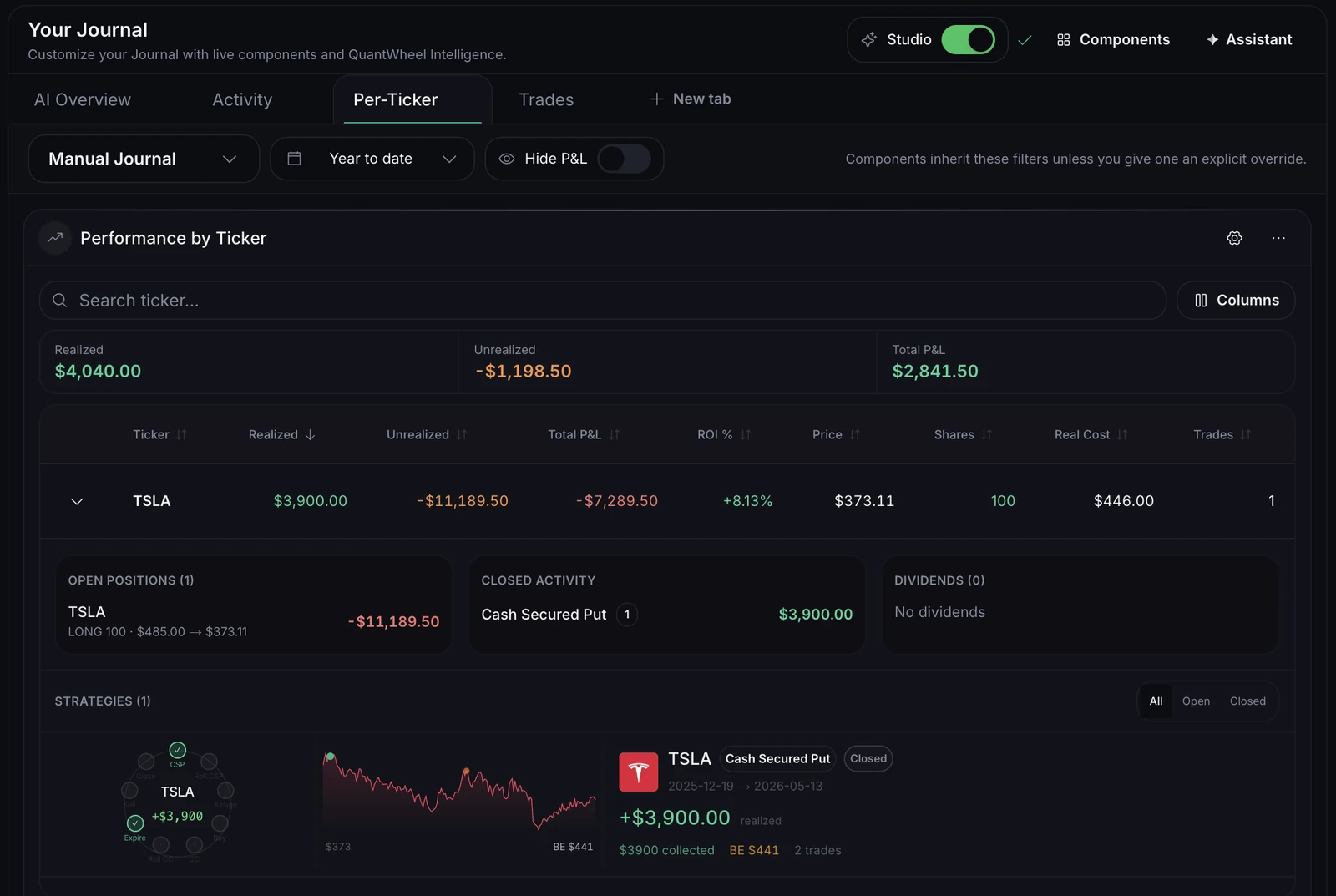
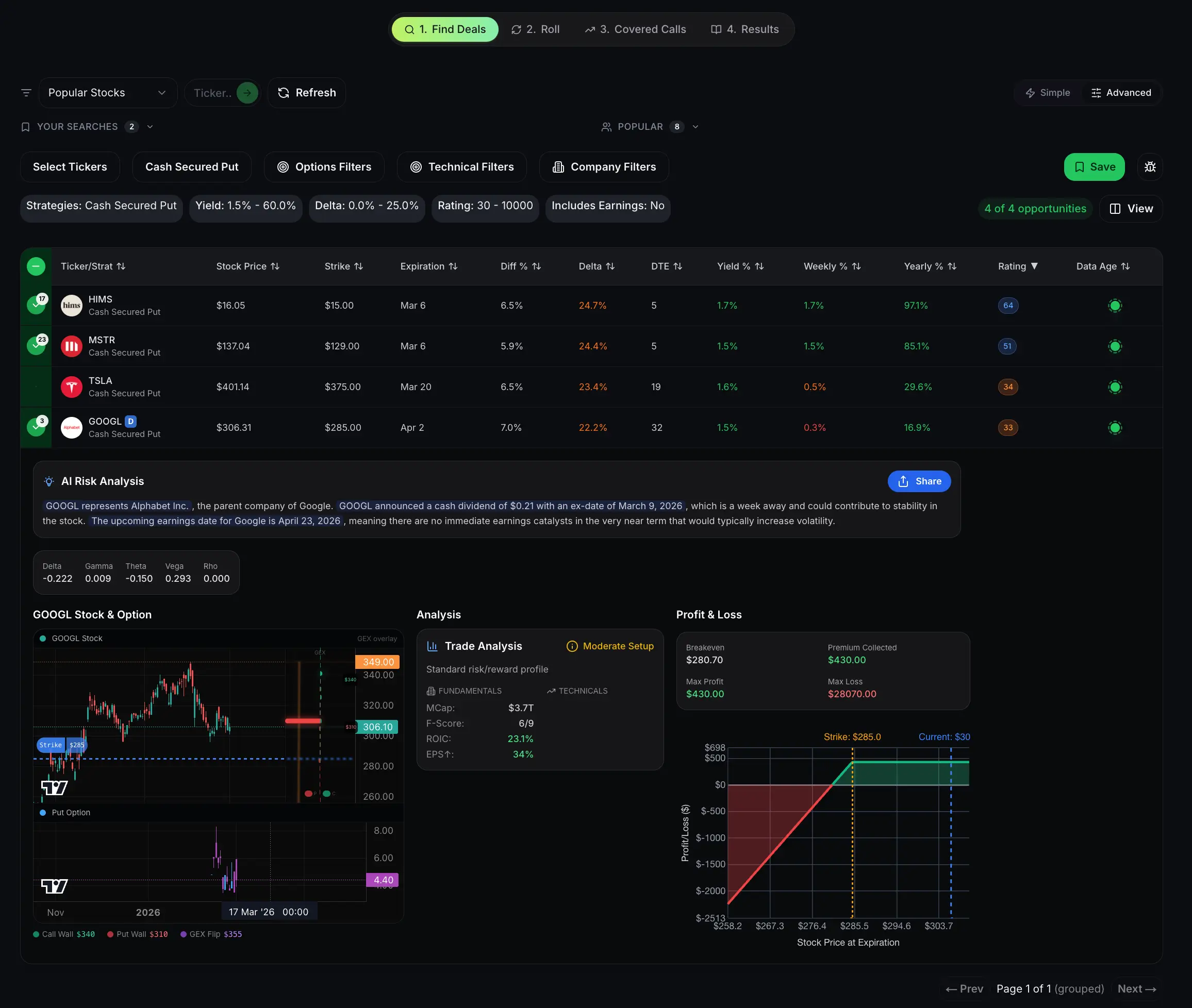
The position tracking (and managing) is what separates beginners and advanced option traders. Here I'll talk about what can help you bridge that gap.
TLDR: Best Options Position Tracking Tools
The short answer: If you sell options using the wheel strategy, QuantWheel is the only software that tracks the full put-to-assignment-to-covered-call lifecycle and automatically adjusts your cost basis. It's like a spreadsheet but done better and more intelligently. It identifies strategies by itself so you don't have to do any manual write-up, all that's left is to just steer your portfolio. QuantWheel will alert, suggest and give you a great overview of your portfolio.
On the other hand, there are other position tracking softwares you could check out and see if they fit. If you trade multiple strategies, combine OptionStrat for visual analysis with WingmanTracker for journaling. They do a great job too.
What matters most in a tracking tool: automatic broker sync (no manual entry), automatic cost basis adjustment on assignment, roll detection, expiration alerts, and portfolio-level risk metrics and suggestions.
In short, a great position tracking tool is like a personal assistant, he does the writing and alerting, you do the steering.
Best Options Position Tracking Tools: Everything You Need to Know
Tracking options positions means keeping accurate records of every open contract, its Greeks, profit and loss, cost basis, and key dates like expiration and earnings. The best options position tracking tools automate this work by syncing with your brokerage account, importing trades in real time, and calculating metrics that spreadsheets get wrong.
Here is the simple version: imagine you sell a cash-secured put on a stock at the $50 strike and collect $2.00 in premium. If you get assigned, your real cost to own that stock is $48 per share, not $50. But your broker shows $50. A good tracking tool adjusts this automatically. A spreadsheet makes you do the math yourself every single time, and one mistake means your entire profit-and-loss picture is wrong.
The tools in this guide fall into three categories. Dedicated tracking software does one thing well: track your trades with precision. Broker-native tools come built into your existing brokerage platform. And free standalone calculators give you access to specific analysis without paying anything. We cover all three so you can mix and match based on what matters most to you.
Dedicated Options Position Tracking Software
These are standalone tools purpose-built for tracking, analyzing, and managing options trades. They go far beyond what your broker provides by default.
QuantWheel: Best Overall Options Position Tracking Tool
QuantWheel earns the top spot because it is the only options software designed from the ground up for options sellers, and it solves the one problem every other tool ignores: automated cost basis tracking through the full position lifecycle. Where other tools try to serve every type of trader with generic features, QuantWheel focuses specifically on the workflow of selling cash-secured puts, managing assignments, writing covered calls, and tracking everything as one connected cycle. The result is a toolkit where your P&L numbers are actually accurate without any manual work.
The Options Screener scans over 3,500 stocks daily in real time, filtering by company fundamentals and options-specific criteria like delta, DTE, IV rank, and annualized yield. Instead of spending 30 to 90 minutes manually checking tickers on thinkorswim, the screener surfaces the best covered call and cash-secured put opportunities in minutes. It includes AI risk analysis so you can evaluate each opportunity with full context before entering a trade.
The Wheel Native Journal is where QuantWheel truly separates itself from the pack. It connects directly to your brokerage account and imports every trade automatically. But unlike generic trade journals, it understands the wheel lifecycle. When you sell a put, get assigned, then sell covered calls on those shares, the journal tracks the entire cycle as one connected position. Most importantly, it automatically adjusts your cost basis when assignment happens. No manual math. No spreadsheet formulas. Your broker says you paid $50 per share. QuantWheel knows you actually paid $48 after accounting for the $2.00 put premium you collected.
The Roll Assistant eliminates one of the most time-consuming parts of managing active positions. When a cash-secured put moves into the money and you need to decide whether to roll, the Roll Assistant analyzes every possible roll across all available expirations and strikes. It calculates the return, equity value, and P&L impact of each option, then ranks them so you can see the best move in seconds instead of spending 45 minutes comparing a dozen possibilities manually.
Copy Trading lets you follow verified traders whose actual positions are synced from their broker accounts. This is not another Twitter feed with unverifiable screenshots. You see real trades, real positions, and real performance from traders whose records are broker-verified. When they execute a trade, you get a notification. You decide whether to follow, with full control over your own position sizing and risk.
The GEX Dashboard provides advanced gamma exposure analytics including charts, Vanna and Charm analysis, and a multi-chart workspace for tracking market maker hedging flows. This is the institutional-grade analysis that used to be available only to professional traders.
QuantWheel supports broker connections with E*TRADE, Schwab, tastytrade, Fidelity, Robinhood, Webull, Interactive Brokers, Tradier, Wealthsimple, and Alpaca. Connections sync your positions. With a broker connection that supports trading, you can also place trades from QuantWheel. You approve each order, and your broker executes it.
Pricing starts at $19 per month on the yearly Advanced plan, with the Pro plan at $31 per month yearly. Both include a 14-day free trial with no credit card required.
OptionStrat: Best for Visual Strategy Analysis
OptionStrat is the go-to tool for traders who think visually. Its strategy builder lets you construct and analyze options positions using profit-and-loss diagrams that update with real market data lagging only 15 minutes for free users. You can model over 50 pre-built strategies or create custom multi-leg positions.
Where OptionStrat excels is visualization. You can see exactly how a position behaves across different stock prices and dates, making it easier to understand risk before entering a trade. The unusual options activity scanner highlights large or atypical positions, which can surface trade ideas based on institutional flow.
OptionStrat is not built around any particular strategy, which makes it versatile but also means it lacks the features that matter most for position tracking: broker sync, automatic trade import, cost basis management, roll detection, and alerts. It does not track your actual positions at all. Think of OptionStrat as a pre-trade analysis tool - excellent for planning, but you still need something like QuantWheel to track what happens after you place the trade.
WingmanTracker: Automated Trade Import and Analysis
WingmanTracker focuses on the import-and-analyze workflow. You connect your brokerage account, and it pulls in your trades automatically with no manual entry. From there, it provides analytics on your trading performance including win rates, profit factors, and detailed breakdowns by strategy and ticker.
For traders who want to understand their edge and identify patterns in their performance, WingmanTracker is a decent choice. It works for stocks, options, and futures trading across multiple asset classes. However, it is a journal and analytics tool only - it does not include screening, alerting, roll analysis, copy trading, or the automated cost basis adjustments that QuantWheel provides. You get trade history and performance stats, but not the proactive workflow tools that help you manage positions in real time.
Option Tracker (optiontracker.io): Clean and Simple
Option Tracker is a straightforward automated trade tracking tool for stock and options traders. Like WingmanTracker, it eliminates manual entry by importing directly from your brokerage account. The interface is clean and focused, making it accessible for traders who need a simple log of their trades. The limitation is the same as WingmanTracker: it tracks what happened but does not help you manage what happens next. There is no screening, no roll optimization, no cost basis adjustment, and no lifecycle tracking - all features that QuantWheel includes by default.
Tradervue: The Veteran Trade Journal
Tradervue has been around for years and has built a reputation as a reliable trading journal. It supports trade import from most major brokers and provides performance analytics, including the ability to tag trades and filter by strategy, setup type, or any custom criteria you define.
The main strength of Tradervue is its flexibility. It works for day traders, swing traders, and options traders alike. The trade-off is that being a general-purpose journal means it has no options-specific intelligence. There is no roll tracking, no automatic cost basis adjustment, no options screening, and no understanding of how a put sale connects to an assignment connects to a covered call. For traders managing complex options positions, you will need to handle the most critical accounting yourself - which is exactly the problem that QuantWheel was built to eliminate.
Broker-Native Options Tracking Tools
Your brokerage platform already includes position tracking tools. These work fine for viewing open positions and basic P&L, but none of them solve the core tracking challenges that active options traders face: automated cost basis adjustment, roll detection, full cycle tracking, and proactive alerting. Here is what each broker does well and where they fall short compared to dedicated software like QuantWheel.
thinkorswim (Charles Schwab)
Thinkorswim is one of the most powerful trading platforms available, and it is completely free for anyone with a Schwab account. The platform includes an Options Strategy Lab for modeling trades, a Volatility Lab for analyzing implied volatility, Risk Navigator for portfolio risk assessment, and a Market Scanner for finding opportunities.
For position tracking, thinkorswim shows your open positions with real-time Greeks, P&L, and probability metrics. You can group positions, set alerts, and analyze risk at the portfolio level. The platform is comprehensive but has a steep learning curve, and the scanner can be slow when running broad market scans with options data.
The significant limitations for options sellers: thinkorswim does not automatically adjust your cost basis when you get assigned on a put, does not link rolls together as part of a continuous position, and does not track the full wheel lifecycle. You need to track all of that manually - or use a dedicated tool like QuantWheel that handles it automatically.
Power E*TRADE (Morgan Stanley)
Power E*TRADE strikes the best balance between usability and depth among broker-native platforms. It offers custom position grouping, real-time streaming Greeks, risk analysis tools, and a clean interface that does not overwhelm you with complexity.
The platform is particularly strong for beginner and intermediate options traders who want solid tools without the learning curve of thinkorswim. Position management is intuitive, with clear P&L displays and helpful risk visualization.
Like all broker platforms, Power ETRADE tracks positions as individual legs. It does not connect a put sale to its assignment to the subsequent covered call as part of a single wheel cycle, does not adjust cost basis for premium collected, and does not optimize rolls. These are the gaps that QuantWheel fills, which is why many traders use Power ETRADE for execution and QuantWheel for tracking and management.
tastytrade
Tastytrade was built for options traders, and it shows. The platform design prioritizes efficient workflow for frequent traders, with per-contract commissions that are lower than most competitors. It includes portfolio risk analysis, an open API, liquidity ratings, and something that sets it apart from most brokers: automatic P&L tracking of rolled options.
That roll tracking feature is a big deal. Most broker platforms treat a roll as two separate transactions, a close and an open. Tastytrade links them together so you can see the impact of your rolls on overall position performance.
For position tracking specifically, tastytrade provides real-time portfolio Greeks, probability of profit calculations, and a clean view of your open positions. The platform has earned recognition as one of the top desktop options trading platforms. Even so, it does not offer full lifecycle tracking, automated cost basis adjustments across multiple legs, an options screener with AI ranking, or copy trading - features where QuantWheel's software extends well beyond what any broker provides.
Fidelity with OptionsPlay
Fidelity integrates OptionsPlay, a powerful tool that surfaces trade ideas, flags risks like upcoming earnings or potential assignment, and suggests exit or roll strategies. This is one of the more helpful broker integrations because OptionsPlay actively analyzes your existing positions and recommends actions.
The Trading Strategy Desk adds another layer of support with licensed professionals who provide personalized guidance. Fidelity plus OptionsPlay is a solid broker-native option for trade ideas and risk flagging. The gap remains the same as other brokers: no automated cost basis adjustment, no full cycle tracking, and no centralized dashboard that connects every leg of your strategy. QuantWheel pairs naturally with Fidelity since it supports Fidelity broker sync directly.
Free Options Tracking and Analysis Tools
You do not need to pay anything to access high-quality options analysis. These free tools provide specific, focused functionality that can supplement your broker or stand on their own.
QuantWheel Free Tools Suite
QuantWheel offers five free tools that anyone can use without a subscription:
GEX Calculator (quantwheel.com/tools/gex-calculator) lets you calculate and visualize Gamma Exposure levels by strike price. You can identify call walls, put walls, and gamma inflection points, which is information that helps you understand where market makers are likely to create support or resistance. Positive GEX means market makers sell into rallies and buy into dips, creating a stabilizing effect. Negative GEX means the opposite, amplifying moves. This kind of analysis used to require expensive institutional data feeds. QuantWheel gives you three free calculations per day.
Mispriced Earnings Tool (quantwheel.com/tools/mispriced-earnings) helps you find options where the market may be pricing in too much or too little movement ahead of earnings announcements. For premium sellers, this is gold. If the expected move is overpriced relative to historical moves, selling options around that event becomes more attractive. This tool surfaces those opportunities so you do not have to manually compare implied and historical volatility for every earnings play.
Optimal Roll Calculator (quantwheel.com/tools/optimal-roll) calculates the best roll strategy for in-the-money options instantly. Enter your current position details and the calculator analyzes available expirations and strikes to find rolls that maximize net credit. No signup required. Three free calculations per day. If you have ever spent 45 minutes comparing a dozen different roll options on your broker platform, this tool alone can save you hours per month.
Options Calculator (quantwheel.com/tools/options-calculator) provides standard options pricing calculations including theoretical values and Greeks based on current market data. This is a clean, fast calculator for quickly evaluating an options trade before you enter it. Input the strike, expiration, and underlying price, and get the math you need without navigating complex option chain interfaces.
Strategy Explorer (quantwheel.com/tools/strategy-explorer) helps you discover and compare different options strategies based on your market outlook and risk tolerance. If you are exploring whether to sell a put, write a covered call, or try a different approach, the Strategy Explorer walks you through the possibilities with clear explanations and trade-offs.
Options Profit Calculator (optionsprofitcalculator.com)
This is one of the most popular free options tools on the internet, and for good reason. Input any stock ticker and options contract, and it generates visual profit-and-loss charts showing your potential outcomes at different stock prices and dates. It supports multi-leg strategies, so you can model spreads, strangles, iron condors, and other complex positions.
The limitation is that it is a modeling tool, not a tracking tool. It does not connect to your broker or import your actual positions. But for pre-trade analysis and education, it is hard to beat at the price of free.
Barchart Options Calculator
Barchart generates fair value prices and Greeks for any U.S. or Canadian equity or index options contract using the Black 76 pricing model. You can customize inputs including option type, strike price, DTE, risk-free rate, volatility, and dividend yield. It is a solid calculator for traders who want to model theoretical values and understand how changes in underlying variables affect option pricing.
OptionCreator
OptionCreator lets you build and analyze multi-leg options strategies with P&L graphs, completely free. It is more basic than OptionStrat but covers the essentials for strategy visualization without requiring an account or payment.
AI-Powered Options Analysis Tools
Artificial intelligence is changing how traders analyze positions and find opportunities. These tools go beyond static screening to provide dynamic, context-aware analysis.
QW Intelligence (QuantWheel)
QW Intelligence is built into QuantWheel and represents a different approach to options analysis. It connects to your actual brokerage account and analyzes your real positions against live market data including news, sentiment, technical and fundamental analysis, and gamma exposure.
What makes QW Intelligence different from generic AI tools is context. When you ask it a question, it knows your actual portfolio. You can type a question like "What is my risk on TSLA if it drops 10%?" and get an answer based on your real positions, not a generic explanation. You can also use natural language to screen: "Find puts on tech stocks with IV rank above 50 and P&E under 25" translates directly into screener results.
This is the direction options tracking is heading. Static position lists are being replaced by AI assistants that understand your portfolio and proactively flag issues, opportunities, and risks.
TradingView
TradingView is not specifically an options tool, but its charting platform with smart alerts ensures traders never miss key levels. The real power for options traders comes from Pine Script, which lets you build custom indicators and automated alert systems. You can integrate third-party AI tools for analysis and create sophisticated trading workflows.
For position tracking specifically, TradingView is limited. It does not import trades, track cost basis, or understand options lifecycles. It is better used as a charting and alerting complement to dedicated options software like QuantWheel, which handles the tracking and management side that TradingView does not attempt.
How to Choose the Right Options Position Tracking Tool
Selecting the right tool depends on your strategy, your portfolio size, and how much manual work you are willing to do. For most active options traders, QuantWheel is the strongest overall choice because it covers every stage of the workflow - screening, execution, tracking, roll management, and analytics - in a single toolkit. Here is how to think about it based on your situation.
If you sell options for income (wheel strategy, covered calls, cash-secured puts), QuantWheel is the clear winner if you ask me, just because it has all at a single place and is precise. No other tool automates cost basis tracking through assignment, links rolls to original positions, or tracks the full put-to-stock-to-call lifecycle. This is the workflow that breaks every spreadsheet and every generic journal. QuantWheel was designed specifically to solve it.
If you trade multiple strategies including spreads, strangles, and directional plays, QuantWheel's screener and journal still cover your needs, but you may want to add OptionStrat for visual strategy modeling on complex multi-leg positions. QuantWheel handles the tracking and management, OptionStrat handles the visual what-if analysis.
If you are just getting started with fewer than five positions, QuantWheel's 14-day free trial gives you full access to test everything without cost. Start with the free tools (GEX Calculator, Optimal Roll Calculator, Options Calculator, Mispriced Earnings, Strategy Explorer) and upgrade when your portfolio grows. Your broker's built-in tools can supplement the basics in the meantime.
If budget is your primary concern, QuantWheel's free tool suite is the most generous in the space - five professional-grade tools with no signup required. The paid plans start at $19 per month, which typically pays for itself by preventing a single missed roll or cost basis error. You can also start with your broker platform and QuantWheel's free tools together until you are ready to commit.
Head-to-Head Comparison: Options Position Tracking Tools
| Feature | QuantWheel | OptionStrat | WingmanTracker | Tradervue | thinkorswim | tastytrade |
|---|---|---|---|---|---|---|
| Automatic broker sync | ✅ | ❌ | ✅ | ✅ | N/A (native) | N/A (native) |
| Cost basis adjustment on assignment | ✅ | ❌ | ❌ | ❌ | ❌ | ❌ |
| Full lifecycle tracking (CSP → assignment → CC) | ✅ | ❌ | ❌ | ❌ | ❌ | ❌ |
| Roll detection and linking | ✅ | ❌ | ❌ | ❌ | ❌ | ✅ |
| Real-time options screener | ✅ | ✅ | ❌ | ❌ | ✅ | ✅ |
| Roll optimizer / assistant | ✅ | ❌ | ❌ | ❌ | ❌ | ❌ |
| Copy trading (verified traders) | ✅ | ❌ | ❌ | ❌ | ❌ | ❌ |
| GEX / Gamma exposure analytics | ✅ | ❌ | ❌ | ❌ | ❌ | ❌ |
| AI-powered portfolio analysis | ✅ | ❌ | ❌ | ❌ | ❌ | ❌ |
| Custom alerts (email, Discord) | ✅ | ✅ | ❌ | ❌ | ✅ | ✅ |
| Free tools available | ✅ (5 tools) | ✅ (limited) | ❌ | ✅ (basic) | ✅ (with account) | ✅ (with account) |
| Price | From $19/mo | From $29/mo | From $39/mo | From $29/mo | Free | Free |
QuantWheel is the only tool in this comparison that checks every box. The automated cost basis adjustment, full lifecycle tracking, and roll assistant are features that no competitor offers, and they are precisely the features that save the most time and prevent the most costly errors for active options sellers.
What to Look for in an Options Tracking Tool
Here are the specific features that separate great options tracking tools from mediocre ones:
Automatic broker sync eliminates the single biggest source of tracking errors: manual data entry. Every trade should flow from your broker into your tracking tool automatically. Delays of a few minutes are acceptable. Delays of a full day, as some integrations have, can cause issues for active traders.
Cost basis adjustment on assignment is the feature most tools get wrong or simply do not attempt. When you sell a put and get assigned, your real cost basis includes the premium you collected. When you then sell a covered call on those shares, each premium collected further reduces your basis. A tool that does not track this chain forces you to calculate it yourself.
Roll detection and linking matters because a roll is not just a close plus an open. It is a continuation of an existing position. Tools that link rolls together give you accurate P&L for the entire position lifecycle. Tools that treat each leg separately make it difficult to evaluate whether your overall strategy on a given stock is profitable.
Alert systems keep you from missing critical events. Expiration dates, profit targets, loss limits, earnings dates, and IV spikes all require attention. The best tools let you set custom conditions and notify you via email, mobile, or Discord when those conditions trigger.
Portfolio-level analytics show you aggregate risk metrics including total delta, theta, and sector concentration. Managing ten or more individual positions without seeing the big picture is how traders accidentally end up overweight in a single sector or using too much margin.
Spreadsheets vs Dedicated Options Tracking Tools
Many traders start with spreadsheets, and spreadsheets are genuinely fine for a small number of positions. The problems start when your portfolio grows.
At three to five positions, a spreadsheet works. You can manually enter each trade, calculate P&L, and track cost basis without too much effort. At ten positions, the spreadsheet starts getting unwieldy. You spend 20 to 30 minutes after each trading day updating your records, and the formulas get complex enough that a single error can propagate through your entire P&L.
At fifteen or more positions, the spreadsheet becomes a liability. Real traders report spending 30 to 45 minutes per day just maintaining their tracking sheet, making calculation errors that cost real money, forgetting to roll positions because they lost track of dates, and filing taxes wrong because their cost basis records were inaccurate.
The breaking point is different for everyone, but the pattern is consistent: the time and money spent maintaining a spreadsheet eventually exceeds the cost of a dedicated tool. QuantWheel's plans are on the pricing page, and it typically pays for itself within the first month by preventing a single cost basis miscalculation or missed roll. If your spreadsheet has ever cost you even one bad decision because the numbers were wrong, that alone justifies switching to software that keeps your data accurate automatically.
Position Tracking for Tax Season
One overlooked benefit of dedicated options tracking tools is tax preparation. Options trades create complex tax situations, especially when assignments, rolls, and wash sales are involved.
Without accurate tracking, preparing your taxes means reconciling your broker's 1099 with your own records, identifying which trades qualify as short-term versus long-term, calculating wash sale adjustments, and piecing together cost basis across multiple legs of the same position.
Tools that maintain accurate records throughout the year reduce tax preparation from days to hours. QuantWheel's automatic trade logging and cost basis tracking means your records match your broker statements from day one, and exports are tax-ready without manual cleanup.
The Future of Options Position Tracking
The options tracking space is evolving rapidly. Two trends are worth watching.
AI-powered analysis is moving from novelty to necessity. QW Intelligence and similar tools are proving that AI can do more than generate text. When connected to real portfolio data and live market feeds, AI assistants can flag risks, suggest trades, and answer complex portfolio questions in natural language. Expect every major tracking tool to offer some form of AI analysis within the next year.
Agentic trading, where AI agents handle research, monitoring, and even trade execution with human approval, is the next frontier. QuantWheel is already developing this capability. The vision is an AI that watches your portfolio 24/7, identifies opportunities that match your strategy, and presents them for your approval. You still make the decisions. The AI handles the tedious work of monitoring, calculating, and filtering.
For now, the practical takeaway is this: the best time to set up proper position tracking is before you need it. Every day you track manually is a day you risk errors, missed opportunities, and wasted time. QuantWheel gives you the most complete options tracking software available today - automated broker sync, cost basis adjustment, roll optimization, AI-powered analysis, and five free tools - with a 14-day free trial that requires no credit card.
Whether you are managing three positions or thirty, the difference between guessing at your numbers and knowing them is the difference between hoping your strategy works and proving that it does.
$1 for 7 days • Cancel anytime • 14-day money-back guarantee
Risk Disclosure: Options trading involves substantial risk and is not suitable for all investors. Past performance does not guarantee future results. This content is for educational purposes only and should not be considered investment advice. Always do your own research and consider consulting with a financial advisor before making investment decisions.
The examples used in this article are for educational purposes only and are not recommendations to buy or sell any security. All investment decisions should be based on your own analysis and risk tolerance.