Author: David Romic – retail options trader and active member in the options trading communities on Reddit (u/thedavidromic).
I share wheel strategy setups, trade management, and lessons learned from real positions.
Let’s get into it.
You have a strategy, the problem is finding trades without spending too much time.
The issue: most screeners stop at finding trades and give no insight.
They find you a trade and then also leave you on your own to track positions, calculate cost basis after assignment, and evaluate rolls manually.
If you ask me, that is just half the job.
After owning all subscriptions for option screeners that are available in 2026, QuantWheel stands out as the best for one reason: it is the only platform that handles the full workflow from screening to trade management.
That’s why I’m writing this article for QuantWheel.
This is what separates it from the rest.
⚠️ Transparency Notice:
This review reflects my genuine assessment, including where QuantWheel falls short.
I’ve done my best to evaluate competitors fairly, but you should factor in that I have a personal interest in QuantWheel.
This guide below breaks down why, compares every major alternative, and covers the best free tools so you can see for yourself and then choose for yourself.
Best Option Screeners in 2026: Everything You Need to Know
An option screener is a tool that filters through thousands of options contracts based on criteria you define, such as risk (delta), implied volatility, days to expiration, premium yield, open interest, and stock fundamentals.
Instead of manually checking tickers one by one, a screener does the scanning for you and presents a shortlist of trades that match your setup.
Think of it this way.
A screener is like a Google search bar – but for trades.
Without a screener, you would need to manually check numerous option chains. With one, the entire process takes under five minutes.
In my opinion, QuantWheel does it the best because it ranks the best trades by the metrics you care about and gives them a proper quality ranking from a custom rating system. Not to mention it also tracks that position for you afterward so you never have to open a spreadsheet.
QuantWheel — Everything you need at one place for trading options in 2026
Before comparing alternatives, it is worth explaining why QuantWheel earned the top spot for me.
It’s because the gap between QuantWheel and everything else is not about one feature – It is about the entire approach.
Most option screeners were designed for day traders or multi-leg spread players and then tacked on a covered call or put filter as an afterthought. They help you find trades, and then you are on your own.
QuantWheel was built from the ground up for a different kind of trader: the premium seller.
Every feature exists to serve one workflow, from finding the trade to managing it through assignment, rolling, and exit.
Where QuantWheel falls short:
As a newer platform (launched 2024–2025), QuantWheel has a smaller public community and fewer third-party reviews than established tools. If you rely heavily on peer forums, community tutorials, or years of user-generated content to validate a tool, older platforms like Barchart have that advantage today. QuantWheel’s track record is still being built — though its feature depth already exceeds most older alternatives.
The Screener: Faster and Smarter Than Anything Else
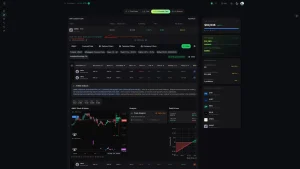
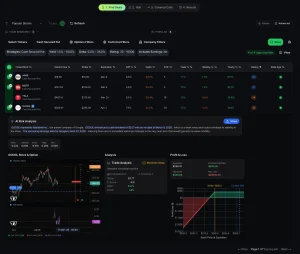
The screener scans 3,500+ stocks daily and evaluates over 570,000 options contracts to surface the best cash-secured put and covered call opportunities.
You set your criteria (delta range, DTE, IV rank, minimum premium yield, stock quality filters) and QuantWheel delivers a ranked list of trades. For context, Market Chameleon and Barchart are faster, but neither calculates annualized premium yield automatically or scores stock quality alongside options metrics.
Each QuantWheel result includes an AI-generated risk analysis and a composite score that blends stock fundamentals and technicals with options data. This prevents the single biggest mistake option sellers make: chasing fat premiums on garbage stocks.
QuantWheel surfaces this context in the same row as the premium data, so you never have to switch tools to evaluate quality.
How does the wheel strategy work, step by step? – Here you can see a step by step guide on how to succesfuly implement the wheel strategy in options trading.
Here’s my last trade using QuantWheel (screenshot from a “share trade” interface you get when sharing a trade with someone:
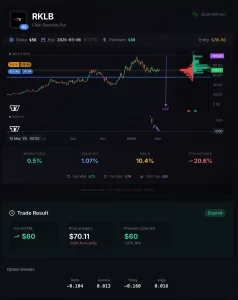
| Ticker | RKLB (Rocket Lab USA) |
| Strategy | Cash-Secured Put |
| Strike | $56 |
| Expiration | March 6, 2026 (9 DTE at entry) |
| Entry Price | $70.56 |
| OTM Distance | 20.6% — strike was well below the current price |
| Premium Collected | $60 per contract |
| Trade ROI | 1.07% |
| Weekly Yield | 0.5% |
| Delta | -0.104 — low probability of assignment |
| QuantWheel Score | 62/100 |
| GEX Levels | Put Wall at $70, Call Wall at $75, GEX Flip at $85 |
What happened: The put expired worthless on March 6 with RKLB trading at $72 — $16 above the strike. Full $60 premium kept. 1.07% ROI in 9 days. Date of entry is Feb 26.
Why I took it: The 20.6% OTM distance gave significant downside buffer. The GEX put wall at $70 indicated market maker support near the stock price, reducing assignment risk further. QuantWheel flagged both the premium yield and the GEX levels in the same view — without switching tools.
What QuantWheel showed me that other screeners wouldn’t: The GEX flip at $85 and put wall at $70 were visible directly in the screener row. No other platform I’ve tested surfaces GEX context alongside the options data automatically.
This is one trade. Options trading involves substantial risk and individual results vary. This is not a recommendation to trade RKLB or any other security.
What Happens After You Screen: The Real Differentiator
Finding a trade is step one. Managing it is where most traders waste hours and make expensive mistakes. This is where QuantWheel separates itself from every competitor on this list.
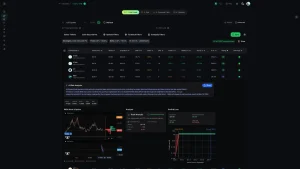
Wheel Native Journal: QuantWheel automatically tracks your positions through every phase of the wheel cycle. Cash-secured put sold, assignment, covered call written, shares called away. It syncs with your broker so you never manually enter a trade. No other screener does this.
Automatic Cost Basis Adjustment: When you sell a $50 put and collect $2 premium, then get assigned, your real cost basis is $48 per share. But your broker shows $50. Every time you collect covered call premium on those assigned shares, the cost basis drops further. QuantWheel is the only platform that adjusts this automatically. Everyone else forces you into a spreadsheet, and spreadsheets break at 10 or more positions.
Roll Assistant: When a position moves against you, the Roll Assistant analyzes every possible strike and expiration combination and recommends the optimal roll for net credit, maximum return, or minimum risk. This replaces the 30 to 45 minutes most traders spend manually comparing roll options and eliminates the decision paralysis that causes traders to delay until the best roll opportunity has passed.
QW Intelligence: An AI assistant that connects to your broker and answers plain-English questions about your portfolio. Ask “Find me puts on tech stocks with IV rank above 50 and P/E under 25” and get instant screener results. Ask “What happens to my portfolio if TSLA drops 10%” for real-time risk analysis. No other screener has anything like this.
Copy Trading: Follow broker-verified traders with transparent, unedited track records and get notified when they execute trades. Unlike Twitter screenshots that are easily faked, QuantWheel verifies every position through the broker connection. Filters let you sort by strategy type, win rate, and risk profile.
Five Free Tools (No Signup Required)
QuantWheel offers the most generous free tier of any option screener. Five tools, no credit card, no email required.
GEX Calculator (quantwheel.com/tools/gex-calculator) — A real-time Gamma Exposure calculator that visualizes GEX levels by strike price and identifies call walls, put walls, and gamma inflection points. Understanding GEX helps you anticipate where market makers are hedging, which directly affects support and resistance levels. Positive GEX environments tend to stabilize prices, while negative GEX environments amplify moves. For premium sellers, this information influences when you enter or avoid new positions.
Mispriced Earnings (quantwheel.com/tools/mispriced-earnings) — Compares current implied volatility against historical earnings moves to flag situations where the market may be overpricing or underpricing the expected move. Sell premium when options are expensive relative to history. Avoid selling when the market is underpricing risk. No other free tool does this calculation for you.
Optimal Roll (quantwheel.com/tools/optimal-roll) — Analyzes your current position and evaluates every available roll option, ranking them by net credit, annualized return, and time to expiration. Three free calculations daily with no signup. This alone saves 30+ minutes per roll decision and replaces guesswork with data.
Options Calculator (quantwheel.com/tools/options-calculator) — A clean options pricing calculator that models how puts and calls respond to changes in stock price, strike, expiration, and volatility. Useful for understanding how Greeks affect your positions and for quickly evaluating whether a contract meets your criteria before placing a trade.
Strategy Explorer (quantwheel.com/tools/strategy-explorer) — Browse and compare different options strategies side by side with risk-reward profiles, margin requirements, ideal market conditions, and clear mechanics for each. For traders still deciding between the wheel, iron condors, or vertical spreads, this gives an objective comparison.
Pricing and Broker Support
Pricing: Starting at $19/month on the annual plan. 14-day free trial, no credit card required. This makes QuantWheel the most affordable premium option screener by a wide margin (Market Chameleon charges $99/mo, Unusual Whales $50/mo, BlackBoxStocks $80 to $100/mo).
Supported Brokers: E*Trade, Fidelity, Robinhood, Schwab, tastytrade, Tradier, Wealthsimple, Webull, Alpaca, Interactive Brokers. Questrade, TradeStation, and Public launching in 2026.
Best for: Any trader who sells options for income. If you run the wheel strategy, sell cash-secured puts, or write covered calls, QuantWheel is the best option screener available and it is not particularly close.
| Feature | QuantWheel | Barchart | Market Chameleon |
|---|---|---|---|
| Wheel strategy focus | ✅ Built for it | ⚠️ Generic | ⚠️ Generic |
| Rolling assistance | ✅ Yes | ❌ No | ❌ No |
| Journaling | ✅ Built-in | ❌ No | ❌ No |
| GEX data | ✅ Yes | ❌ No | ⚠️ Limited |
| Earnings strategy suggestions | ✅ Yes | ❌ No | ⚠️ Partial |
| Mobile app | ✅ Yes | ✅ Yes | ✅ Yes |
| Community & track record | ⚠️ Newer platform | ✅ Established | ✅ Established |
| Free tier | Sandbox mode | ✅ Yes | ✅ Yes |
Other Paid Option Screeners Worth Considering
Some traders have specific needs that other platforms serve. Here is what else is available and where each one falls short compared to QuantWheel.
Market Chameleon — Most Data, Highest Price
Market Chameleon has been in business since 2007 and offers arguably the most comprehensive raw options analytics available. It covers unusual options volume, implied volatility rankings, buy-write searches, zero-DTE option analysis, and open interest insights.
The screener’s strength is breadth. You can filter the options market by IV percentile, earnings date proximity, unusual volume relative to open interest, and dozens of other criteria. For experienced traders who need analytics across many strategy types, it is powerful.
Where it falls short: Market Chameleon costs $99 per month with no annual discount. That is five times the cost of QuantWheel. It does not include position tracking, cost basis adjustment, or roll optimization. You find the trade in Market Chameleon, and then you need a separate tool (or a spreadsheet) to manage it. It also does not calculate annualized premium yield for income strategies, which means you are doing that math yourself.
Best for: Experienced multi-strategy traders who need deep analytics and do not mind paying $99/mo for data alone.
Unusual Whales — Best for Flow Data, Not for Screening
Unusual Whales excels at surfacing institutional money flow, dark pool activity, large block trades, sweeps, and abnormal volume patterns. The options flow tools include real-time alerts, contract lookups, flow charting, and dedicated 0DTE flow tracking.
Where it falls short: Unusual Whales is built for directional traders who follow institutional positioning, not for income sellers. It does not calculate premium yield, does not score stock quality for premium selling, and has no position tracking or cost basis features. If you sell covered calls or cash-secured puts, the data Unusual Whales provides is not directly relevant to your decision-making.
Pricing: $50/month or $44/month on the annual plan. Over double QuantWheel’s price for a narrower use case.
Best for: Traders focused on options flow and institutional activity rather than premium selling.
Option Samurai — Broadest Strategy Coverage
Option Samurai supports 24 different options strategies in its scanner, from covered calls and naked puts to iron condors, butterflies, and diagonals. The scanner uses live data from multiple sources and allows fine-tuned filtering.
Where it falls short: Breadth is Option Samurai’s strength and its weakness. Because it covers 24 strategies, none are as deeply optimized as QuantWheel’s coverage of premium selling. It does not include position tracking, cost basis adjustment, roll optimization, or AI risk scoring. You find trades across many strategies but manage them elsewhere. A free two-week trial with no credit card required makes it easy to test.
Best for: Traders who actively run multiple different options strategies and need one scanner to cover all of them.
BlackBoxStocks — Built for Day Traders
BlackBoxStocks combines real-time analytics for both stocks and options with proprietary algorithms that detect market movements. The platform connects to multiple trading platforms and features real-time alerts for unusual activity, dark pool tracking, and an integrated chat room.
Where it falls short: At $99.97/month (or $79.92 on annual), BlackBoxStocks costs four to five times more than QuantWheel and is designed for active day traders, not income sellers. It does not calculate premium yield, does not filter for wheel-specific criteria, and does not track positions or cost basis. The chat room is valuable for day traders but irrelevant for systematic premium sellers.
Best for: Active day traders who want real-time alerts and a trading community, not income-focused screening.
optionDash — Simple but Limited
optionDash offers an intuitive covered call and cash-secured put screener with a proprietary stock scoring system (Value, Quality, Trend). One click switches between covered call and CSP mode.
Where it falls short: optionDash is clean and easy to use but offers no AI risk analysis, no position tracking, no cost basis management, no roll optimization, and no alerts. It screens and nothing more. For beginners who just want a simple covered call screener, it works. For anyone managing more than a handful of positions, the lack of workflow features becomes a bottleneck quickly.
Best for: Beginners who want the simplest possible covered call and CSP screener.
Wheel Strategy Options — Closest Competitor, Still Missing Half the Workflow
WheelStrategyOptions.com focuses exclusively on the wheel strategy workflow with separate tabs for cash-secured puts and covered calls. It scans 570,000+ option contracts and displays 15+ data points per trade.
Where it falls short: While it screens well for the wheel, it lacks the journal, automatic cost basis tracking, roll assistant, AI analysis, copy trading, and broker integration that QuantWheel provides. It is a screener. QuantWheel is a complete platform. The screening itself is comparable, but everything that happens after you find a trade is where QuantWheel pulls away decisively.
Best for: Traders who only need screening and already have a separate solution for position tracking.
Best Free Option Screener Tools in 2026
Beyond QuantWheel’s five free tools (covered above), several other free screeners are worth knowing about.
Barchart Options Screener
Barchart provides one of the most capable free options screeners for general use. You can filter by trading volume, days until expiration, open interest, moneyness, and implied volatility. Pre-set screens for unusual option activity, high implied volatility, and large changes in open interest make it easy to find starting points without configuring anything.
The free version covers basic screening. Advanced features like options flow, detailed volatility data, and extended analytics require Barchart Premier at $29.95/month or $199.95/year. Barchart does not calculate annualized premium yield or score stock quality, so for income sellers it requires more manual work than QuantWheel’s free tools.
Best for: Free, no-signup general options screening with solid customization.
thinkorswim Option Hacker (Charles Schwab)
If you have a Charles Schwab account (free to open), you get full access to thinkorswim’s Option Hacker. This tool allows up to 25 scan filters combining stock, options, study values, and fundamental data. You can build custom scans, see real-time Level II data, access probability analysis, and evaluate risk-reward profiles.
The limitation is speed. Scanning 50 to 100 tickers with detailed options data can take 5 to 10 minutes in thinkorswim, versus seconds in QuantWheel. It also does not calculate premium yield, track positions, or manage cost basis. But for the price (free with any Schwab account), the raw analytical depth is solid.
Best for: Schwab account holders who want deep, customizable scanning and do not mind slower speed.
CBOE Volatility Finder
The Chicago Board Options Exchange offers a Volatility Finder that scans for stocks with the highest and lowest implied-volatility options and identifies which options have the fastest-changing implied volatilities. The CBOE also offers a Trade Optimizer where you input a symbol, your sentiment, a target price, and expiration date, and the tool suggests potential strategies with relevant statistics.
Best for: Volatility-focused traders who want data from the authority on options exchanges.
OptionStrat
OptionStrat is one of the friendliest free options tools for beginners. The free version includes basic options visualization and trade modeling. The Pro tier at $20/month adds more advanced screening. It is better for learning options mechanics and visualizing trade outcomes than for serious screening, but a good place to start. For the same free cost, QuantWheel’s Strategy Explorer and Options Calculator offer more actionable screening data.
Best for: Complete beginners who want visual trade modeling before committing to any strategy.
Why QuantWheel Beats Every Other Option Screener
To make the comparison concrete, here is how QuantWheel stacks up against the field across the features that actually matter for finding and managing trades.
Speed
QuantWheel scans 3,500+ stocks and 570,000+ contracts in under five minutes. Thinkorswim takes 5 to 10 minutes for 50 to 100 tickers. Market Chameleon and Barchart are fast for individual lookups but do not offer the same combined screening across yield, quality, and options metrics. When IV spikes during market hours, speed determines whether you catch the opportunity or read about it on Reddit later.
Intelligence
QuantWheel is the only screener that applies AI risk analysis to every result, blending options data with stock fundamentals into a single score. Every other screener either shows raw data and lets you sort manually, or offers basic ranking without true risk-adjusted scoring. This means QuantWheel is the only screener where you can trust the ranking without cross-referencing another tool.
Workflow Integration
This is QuantWheel’s biggest advantage and where every competitor fails completely. Screening is maybe 10% of the work. The other 90% is tracking positions, adjusting cost basis after assignments, evaluating rolls, and knowing your real P&L. QuantWheel handles all of it automatically. Every other screener on this list requires a separate journal, spreadsheet, or tracking tool for post-screening workflow.
Cost
At $19/month on the annual plan, QuantWheel is the most affordable premium option screener. Market Chameleon costs $99/mo (5.2x more), BlackBoxStocks costs $80 to $100/mo (4 to 5x more), and Unusual Whales costs $44 to $50/mo (2.3 to 2.6x more). Even optionDash’s premium features cost more for less. QuantWheel delivers the most value per dollar by a wide margin.
Free Tools
No competitor matches QuantWheel’s free offering. Five professional-grade tools (GEX Calculator, Mispriced Earnings, Optimal Roll, Options Calculator, Strategy Explorer) with no signup required. Barchart’s free tier is solid for basic screening but does not include any calculation tools. Thinkorswim requires a Schwab account. Other free options either have delayed data or limited functionality.
How to Choose the Right Option Screener for Your Strategy
If You Sell Premium in Any Form (Wheel, CSPs, Covered Calls)
QuantWheel. There is no second-best option here. It is the only screener built specifically for premium sellers, and it is the cheapest premium tool on the market. The free trial makes it risk-free to test.
If You Trade Options Flow and Momentum
If your strategy is based on following institutional money and dark pool activity rather than selling premium, Unusual Whales is the best fit. Market Chameleon is also strong here, though at double the price.
If You Run Many Different Strategies
Option Samurai covers 24 strategies in a single scanner. If you frequently switch between iron condors, butterflies, directional plays, and premium selling, the breadth is useful. But if premium selling is your primary approach, QuantWheel’s depth in that specific category will serve you better than Option Samurai’s breadth.
If You Are Just Starting Out
Start with QuantWheel’s free tools. The Options Calculator teaches you how Greeks work, the Strategy Explorer helps you compare strategies, and the Mispriced Earnings tool shows you real market data. Once you are ready to screen and trade, the 14-day free trial of the full platform is the natural next step.
Key Features to Evaluate in Any Option Screener
Real-Time Data vs Delayed Data
Options pricing changes fast. A screener using 15-minute delayed data will show you opportunities that may no longer exist by the time you try to execute. QuantWheel and Market Chameleon use real-time data. Many free tools use delayed data, which is fine for learning but risky for execution.
Annualized Yield Calculation
This is critical for premium sellers and one of the biggest differentiators between screeners. A $2 premium on a $50 stock with 30 DTE is a very different trade from a $2 premium on a $50 stock with 7 DTE. QuantWheel calculates annualized yield automatically. Most competitors, including Market Chameleon, Barchart, and thinkorswim, leave this calculation to you.
AI Risk Scoring
Raw data without context is dangerous. High premium often means high risk. QuantWheel is the only screener that scores each opportunity with AI, combining options metrics with stock fundamentals so you do not blindly chase yield on deteriorating companies. No other screener on this list offers true AI-powered risk-adjusted ranking.
Post-Screening Workflow
The best screener in the world is only as good as what comes next. If you find a great trade but cannot track it, calculate your real cost basis, or evaluate rolls efficiently, you are leaving money on the table. QuantWheel is the only screener that integrates screening with position management, cost basis tracking, and roll optimization.
Alerts and Notifications
A screener that only works when you are sitting in front of it has a blind spot: the hours you spend away from the screen. QuantWheel’s real-time alerts via email and Discord notify you when opportunities matching your criteria appear, so you do not miss IV spikes or earnings-driven premium.
Common Mistakes When Using Option Screeners
Chasing the Highest Premium
A high premium often signals high risk. Stocks with the fattest premiums tend to have elevated implied volatility for a reason, such as earnings, pending FDA decisions, or sector-wide fear. If your screener sorts by premium alone without factoring in stock quality, you will end up selling puts on the riskiest names in the market.
The fix: use a screener like QuantWheel that combines premium yield with stock quality metrics and AI risk scoring. This prevents you from blindly chasing yield, which is the number one mistake new premium sellers make.
Ignoring Earnings Dates
Selling a 30-DTE put on a stock that reports earnings in 5 days is a completely different trade than selling that same put after earnings. Many screeners do not filter for upcoming earnings by default. QuantWheel flags earnings dates in the screener results, and the free Mispriced Earnings tool lets you evaluate whether the implied move is priced fairly.
Using a Screener Without Position Tracking
Finding great trades does not matter if you cannot manage them. Traders who use a screener without integrated position tracking inevitably end up in spreadsheet chaos, especially after assignments and rolls. QuantWheel eliminates this entirely by connecting screening to tracking in one platform.
Quick Comparison: Best Option Screeners at a Glance
| Screener | Best For | Price | Free Trial | AI Scoring | Position Tracking | Cost Basis | Roll Optimizer |
|---|---|---|---|---|---|---|---|
| QuantWheel | Premium sellers & wheel | $19/mo | 14 days | Yes | Yes | Yes | Yes |
| Market Chameleon | Multi-strategy analytics | $99/mo | 7 days | No | No | No | No |
| Unusual Whales | Options flow & dark pools | $44/mo | No | No | No | No | No |
| Option Samurai | 24-strategy scanning | Varies | 14 days | No | No | No | No |
| BlackBoxStocks | Day trading alerts | $80/mo | No | No | No | No | No |
| optionDash | Simple CC/CSP | Free/Premium | Free tier | No | No | No | No |
| Barchart | Free general screening | Free/$30/mo | Free tier | No | No | No | No |
| thinkorswim | Schwab users | Free | 30-day guest | No | No | No | No |
| CBOE Tools | Volatility data | Free | Free | No | No | No | No |
| OptionStrat | Beginners | Free/$20/mo | Free tier | No | No | No | No |
The pattern is clear. QuantWheel is the only screener that offers AI scoring, position tracking, cost basis adjustment, and roll optimization. Every competitor requires you to cobble those features together from separate tools, spreadsheets, or manual work.
The Bottom Line: Why QuantWheel suits me
The best option screener is the one that does more than screen. Finding trades is the easy part. What separates profitable traders from everyone else is what happens next: tracking positions accurately, knowing your real cost basis, making optimal roll decisions quickly, and having a clear picture of your portfolio risk at all times.
QuantWheel is the only platform that handles this entire workflow.
Risk Disclosure: Options trading involves substantial risk and is not suitable for all investors. Past performance does not guarantee future results. This content is for educational purposes only and should not be considered investment advice. Always do your own research and consider consulting with a financial advisor before making investment decisions. The examples used in this article are for educational purposes only and are not recommendations to buy or sell any security.