
You sold a cash-secured put, collected $200 in premium, and got assigned on the stock. Your broker shows you bought 100 shares at $50. But that's not your real cost.
What most options traders miss? - your broker's cost basis is wrong. Well, not exactly wrong - but incomplete. They show $50 per share because that's the strike price. But you collected $2 in premium, so your true cost basis is $48 per share. That $2 difference matters, especially when you're running the wheel strategy and getting assigned regularly.
This is where manual tracking falls apart. After your third or fourth assignment, calculating your actual cost basis becomes harder.
Which premiums did you collect on which positions? What's your real breakeven? How much profit are you actually making?
Simplify journaling Wheel trades with QuantWheel →
TLDR: Understanding Cost Basis After Options Assignment
What You Need to Know:
When you sell an option and get assigned, your broker records the assignment price as your cost basis - but this doesn't include the premium you collected. Your true cost basis requires manual adjustment.
Cash-Secured Put Example:
- You sell a $50 put on stock XYZ for $2 premium ($200 total)
- Stock drops and you get assigned 100 shares
- Broker shows: Cost basis = $50/share
- Your TRUE cost basis = $48/share ($50 strike - $2 premium)
- You break even if stock reaches $48, not $50
Why This Matters: Every dollar of premium you collect lowers your real cost basis. For a 14-year-old's analogy: imagine you agree to buy a video game for $50, but someone pays you $2 upfront to make that promise. If you end up buying the game, it really only cost you $48 because you already got paid $2.
The Problem: Most traders track this in spreadsheets, which breaks down after 5-10 positions. Professional tracking software automatically adjusts your cost basis when assignments happen.
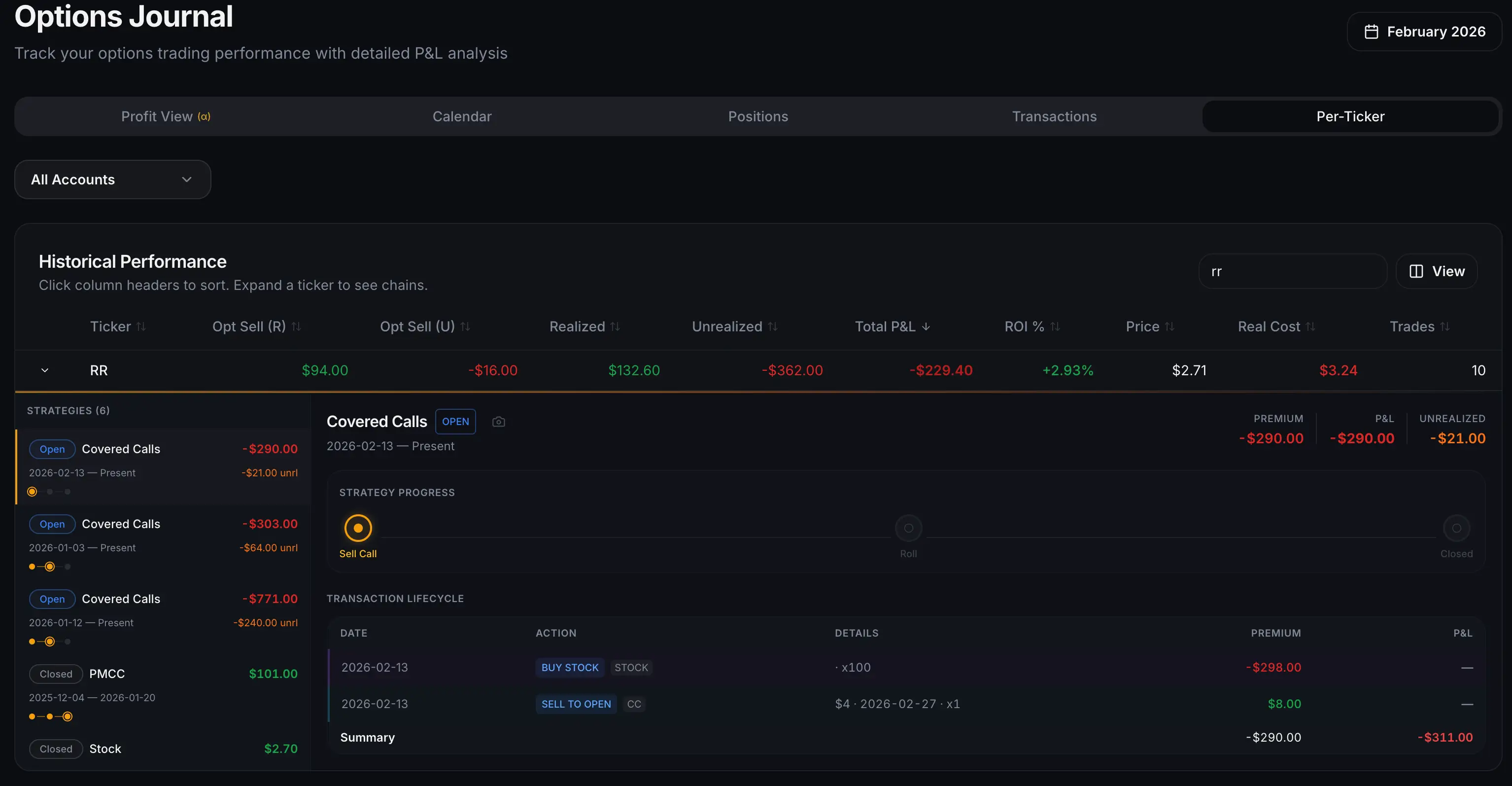
See how QuantWheel tracks trades →
What Is Cost Basis in Options Trading?
Cost basis is your total investment in a stock or security, used to calculate capital gains or losses for tax purposes and to determine your real profit or loss on a trade.
For regular stock purchases, cost basis is straightforward: if you buy 100 shares at $50, your cost basis is $5,000 ($50 x 100 shares).
But with options, especially when running strategies like the wheel, cost basis becomes more complex. You're collecting premiums before you even own the stock, then potentially collecting more premiums after assignment. Each premium collected adjusts your effective cost basis.
Your broker tracks cost basis, but here's the catch: brokerage cost basis only shows the assignment price, not your premium-adjusted cost basis. This creates a gap between what your broker says you paid and what you actually paid when accounting for all premiums collected.
Why Brokers Don't Show Your True Cost Basis
When you get assigned on an option, your broker records the transaction as a stock purchase at the strike price. This is technically correct for the stock transaction itself - you did buy the stock at that strike price.
However, the premium you received when you originally sold the option is recorded separately as a closed options trade. Your broker's system treats these as two different transactions:
- Closed option position: You sold a put for $2 premium (recorded as $200 income)
- Stock purchase: You bought 100 shares at $50 strike (recorded as $5,000 purchase)
The problem? These transactions aren't automatically linked in your broker's cost basis calculation. Your monthly statements and tax forms will show the stock purchase at $50 per share without adjusting for the $2 premium you collected.
This isn't necessarily your broker's fault. The IRS allows different cost basis calculation methods, and brokers typically use the most conservative approach that follows securities regulations. They're recording each transaction accurately - they're just not calculating your real economic cost basis automatically.
For casual investors buying and holding stock, this works fine. For options traders running the wheel strategy and cycling through assignments regularly, this becomes a tracking nightmare.
How to Calculate Cost Basis After Getting Assigned
Let's break down the exact calculations for different assignment scenarios.
Cash-Secured Put Assignment: The Foundation
When you sell a cash-secured put and get assigned, your true cost basis calculation is:
True Cost Basis = Strike Price - Premium Received
Example:
- Sell one $50 put on AMD for $2.00 premium
- Premium collected: $200 (1 contract x 100 shares x $2)
- AMD drops to $47 and you get assigned
- Broker shows: 100 AMD shares at $50/share cost basis = $5,000
- Your TRUE cost basis: $50 - $2 = $48/share = $4,800
You're already profitable if AMD reaches $48, not $50. That's a $200 difference in your breakeven calculation.
The Full Wheel Cycle: Compounding Premium
The wheel strategy involves multiple premium collections: first from the cash-secured put, then from covered calls after assignment. Each premium further reduces your effective cost basis.
True Cost Basis = Strike Price - Put Premium - (All Call Premiums Collected)
Example of a complete wheel cycle:
- Sell Put: Sell PLTR $40 put for $1.50 premium ($150)
- Get Assigned: PLTR drops to $38, you're assigned at $40
- Broker cost basis: $40/share
- Your cost basis: $40 - $1.50 = $38.50/share
- Sell Call: Sell PLTR $42 call for $0.80 premium ($80)
- Stock doesn't hit $42, call expires worthless
- Your cost basis: $38.50 - $0.80 = $37.70/share
- Sell Another Call: Sell PLTR $41 call for $0.90 premium ($90)
- Stock rallies to $42, you get called away at $41
- Your cost basis: $37.70 - $0.90 = $36.80/share
- Sale price: $41/share
- Total profit: $4.20/share or $420
Premium breakdown:
- Put premium: $1.50
- First call premium: $0.80
- Second call premium: $0.90
- Stock gain: $1.00 ($41 sale - $40 assignment)
- Total profit: $4.20/share
Your broker's simplified view would show you bought at $40 and sold at $41 for $1/share profit ($100), missing the additional $320 in premiums.
This is where most spreadsheet systems break. You're tracking multiple positions through multiple assignments and call sales. After managing 10-15 positions simultaneously, the manual calculations become overwhelming.
When You Sell Calls Before Assignment
Some traders sell covered calls against stock they already own, not through the wheel strategy. The cost basis calculation is similar but starts differently.
Example:
- You own 100 shares of NVDA, purchased at $450/share (cost basis: $45,000)
- You sell a $470 covered call for $8 premium ($800)
- NVDA rallies to $480, your shares get called away at $470
Your profit calculation:
- Stock appreciation: $470 - $450 = $20/share ($2,000)
- Call premium: $8/share ($800)
- Total profit: $28/share or $2,800
Your effective cost basis was reduced from $450 to $442 once you collected the call premium ($450 - $8).
Cost Basis Tracking Challenges for Active Traders
Here's where theory meets reality. If you're running one or two wheel positions, manual tracking is manageable. You can write down the premiums in a notebook and adjust your cost basis when assignments happen.
But the wheel strategy scales. Most serious wheel traders run 10-30 positions simultaneously across different stocks. Each position might:
- Get assigned at different times
- Have multiple call sales after assignment
- Get called away or held through multiple cycles
- Require rolling (extending expiration and adjusting strikes)
Suddenly you're tracking:
- 30 different stocks
- 50+ premium collections per month
- Multiple assignments and call-aways
- Adjusted cost bases that change with each new call sale
- Tax lot accounting for partial position closures
This is exactly why most traders give up on accurate cost basis tracking and just estimate their profits. But estimates don't work for tax purposes, and they definitely don't help you understand if your strategy is actually profitable.
Tax Implications of Incorrect Cost Basis Tracking
The IRS requires you to report your actual cost basis when you sell securities. If you report the broker's basis (which doesn't include premiums), you'll overpay on taxes.
Example:
- True cost basis after premiums: $48/share
- Broker-reported cost basis: $50/share
- You sell stock at $55/share
Using broker's basis:
- Capital gain: $55 - $50 = $5/share
- Tax owed (20% long-term rate): $1/share x 100 shares = $100
Using correct basis:
- Capital gain: $55 - $48 = $7/share
- Tax owed (20% long-term rate): $1.40/share x 100 shares = $140
Wait, that means you owe MORE tax with correct basis? Yes, but that's because you already paid tax on the premium income when you collected it. The premium is taxed as short-term income in the year received.
When you adjust your cost basis for premiums already taxed, you're avoiding double taxation while ensuring accurate capital gains reporting.
The bigger problem: if you don't track premiums and report the broker's higher basis, you're understating your actual profit, which could trigger IRS scrutiny during an audit. Premium income is reported separately, so the IRS can see you collected premiums that should have reduced your cost basis.
Professional traders maintain detailed records of:
- Every premium collected with dates
- Assignment dates and prices
- Adjusted cost bases for each position
- Tax lot tracking for partial sales
This documentation protects you during audits and ensures accurate tax filings.
Manual Cost Basis Tracking Methods
If you're committed to manual tracking, here's the system that works best:
The Spreadsheet Method
Create a spreadsheet with these columns:
- Ticker symbol
- Trade date
- Transaction type (Sell Put, Assignment, Sell Call, Called Away)
- Strike price
- Premium collected
- Running cost basis
- Quantity of shares
Example spreadsheet:
| Ticker | Date | Type | Strike | Premium | Shares | Cost Basis |
|---|---|---|---|---|---|---|
| AMD | 01/15 | Sell Put | $50 | $2.00 | 0 | - |
| AMD | 01/20 | Assigned | $50 | - | 100 | $48.00 |
| AMD | 01/21 | Sell Call | $52 | $0.75 | 100 | $47.25 |
| AMD | 02/17 | Call Expired | - | - | 100 | $47.25 |
| AMD | 02/18 | Sell Call | $51 | $0.90 | 100 | $46.35 |
| AMD | 03/15 | Called Away | $51 | - | 0 | - |
Total profit: ($51 - $50) + $2.00 + $0.75 + $0.90 = $4.65/share or $465
This method works, but it's tedious. You're updating the spreadsheet after every trade, calculating running totals, and hoping you don't make formula errors.
The Notebook Method
Some traders keep a physical notebook with one page per position. They write down:
- Initial put sale details
- Assignment date and cost
- Each subsequent call sale
- Final exit or current status
This is even more manual than spreadsheets but can work for traders managing fewer than 5 positions at a time.
The Broker Trade History Export Method
Most brokers let you export trade history to CSV. You can download this periodically and use spreadsheet formulas to calculate adjusted cost basis.
The challenge: broker exports don't link related transactions. You need to manually identify which options assignments correspond to which stock purchases, then match those to subsequent call sales on the same shares.
For 3-4 positions, this takes 30 minutes per month. For 20+ positions, it becomes a part-time job.
Automated Cost Basis Tracking Solutions
Here's where most traders struggle: calculating your actual cost basis after assignment. Let's say you sold a $50 strike put after collecting $2 premium. Your real cost is $48, but broker shows $50. You have to track this manually for every position.
This is exactly where software like QuantWheel changes the game. QuantWheel automatically adjusts your cost basis when assignments happen. The moment you're assigned on a cash-secured put, the system:
- Recognizes the assignment
- Links it to the original put sale
- Calculates your premium-adjusted cost basis
- Updates your position dashboard with accurate breakeven prices
When you sell covered calls after assignment, QuantWheel tracks those premiums too, continuously updating your cost basis as you collect more premium through the wheel cycle.
No manual spreadsheet updates. No formulas to debug. No missing premiums in your calculations.
$1 for 7 days • Cancel anytime • 14-day money-back guarantee
How Professional Traders Track Cost Basis
Professional options traders and market makers use specialized trading platforms with built-in cost basis accounting. These platforms:
- Automatically link options trades to underlying stock positions
- Calculate real-time P&L including all premiums
- Generate tax-ready reports with correct basis adjustments
- Handle complex scenarios like rollings and adjustments
- Track tax lots for partial position closures
Retail traders historically didn't have access to this level of automation. They were stuck with either expensive professional platforms designed for trading desks, or manual spreadsheets that break at scale.
Software like QuantWheel brings professional-grade cost basis tracking to retail traders running the wheel strategy. It was built specifically to handle the cost basis challenges that wheel traders face:
- Automatic premium tracking through complete wheel cycles
- Assignment detection and basis adjustment
- Multi-position portfolio tracking
- Tax reporting with correct adjusted basis
This is the difference between tracking 5 positions in a spreadsheet versus managing 25 positions in a purpose-built tool. The spreadsheet might be "free," but your time isn't. More importantly, incorrect cost basis tracking can cost you in inaccurate profit calculations and tax reporting errors.
Cost Basis Tracking for Different Options Strategies
While this guide focuses on the wheel strategy, other options strategies have their own cost basis considerations.
Iron Condors and Credit Spreads
These strategies involve multiple options legs. Cost basis tracking focuses on net premium collected across all legs, not on stock ownership since assignment is typically avoided.
If you get assigned on one leg, you need to track the stock cost basis while managing the remaining options positions - a complex scenario that benefits from automated tracking.
LEAPS and Long-Term Options
When buying long-dated options (LEAPS), your cost basis is simply the premium paid plus commissions. If you exercise the option to buy stock, your stock cost basis is the strike price plus the LEAP premium paid.
Collar Strategy
Collars involve owning stock, selling a call, and buying a put for protection. Cost basis remains the stock purchase price, but your effective profit range changes based on premiums paid and collected.
Common Cost Basis Tracking Mistakes
Mistake #1: Forgetting to track small premiums
That $0.25 call premium ($25) seems insignificant, but after 10 call sales, you've collected $250 in premium that's lowering your cost basis. Small premiums add up.
Mistake #2: Not adjusting basis for early assignments
If you get assigned early (before expiration), you still collected and keep the premium. Don't forget to adjust your basis for that full premium amount.
Mistake #3: Losing track after rollings
When you roll an option (close current position, open new one), you're collecting additional premium (or paying to roll up). This needs to be tracked as it affects your total premium collected and cost basis.
Mistake #4: Mixing up tax lots
If you have multiple entries into the same stock through different assignments, you have different cost basis tax lots. Selling shares requires specifying which tax lot you're selling from for accurate gain/loss calculation.
Mistake #5: Giving up on tracking entirely
The most common mistake: tracking works for 2-3 months, then life gets busy, you miss a few updates, and you give up entirely. You end up estimating profits instead of knowing them.
This is where the choice between manual tracking and automated systems becomes clear. Manual tracking requires consistent discipline. Miss a few weeks of updates, and your spreadsheet is worthless. Automated systems keep tracking whether you log in daily or weekly.
Your Cost Basis Tracking Decision
You have three paths forward:
Path 1: Manual spreadsheet tracking
- Works for 1-5 positions
- Requires 30-60 minutes per month
- Risk of formula errors and missed premiums
- Free, but time-consuming
Path 2: Give up on detailed tracking
- Estimate profits based on broker statements
- Risk incorrect tax reporting
- Miss optimization opportunities from inaccurate P&L
- Potential issues during IRS audits
Path 3: Use automated tracking
- Handles unlimited positions
- Continuous cost basis updates
- Accurate P&L and tax reporting
- Requires paid tool subscription
For traders managing 1-2 casual positions, manual tracking is reasonable. For anyone running the wheel strategy seriously with 10+ positions, automated tracking becomes essential.
The wheel strategy only works if you can manage it systematically. Cost basis tracking is part of that system. When your tracking breaks down, your ability to make good trading decisions breaks down too.
$1 for 7 days • Cancel anytime • 14-day money-back guarantee
Risk Disclosure: Options trading involves substantial risk and is not suitable for all investors. Past performance does not guarantee future results. This content is for educational purposes only and should not be considered investment advice. Always do your own research and consider consulting with a financial advisor before making investment decisions.
Tax Disclaimer: Tax rules are complex and change regularly. The information provided here is for educational purposes and should not be considered tax advice. Consult with a qualified tax professional regarding your specific situation.